Note: Supersedes VITA-2018-02
VTA-2018-03: Taxpayers Receive Fraudulent Refunds in Preparer Data Breach Scheme
Reason issued: To alert VITA/TCE volunteers about a tax refund scam affecting taxpayers
VTA 2018 Archives
Pro Online 2017: Save & Exit from submission page rare scenario — (RESOLVED)
Scenario: Your federal return is accepted. You open the return and navigate to the e-file page, but your intent is just to look and not send the state as “State only”. You click “Save” and navigate to the submission page. At this point, you click “Save and Exit” return.
Problem: You receive the confirmation page that the efile has been sent even though you selected “Save and Exit”. Unfortunately, this will result in a subsequent 902 reject from the IRS.
Work around: If you are needing to review these pages, but are not sending the state as “state only”, click Back until you get to the Summary/Print page and exit the return from there.
Solution: This will be resolved in an update on Friday, Febuary 23rd.
blog posted 02/22/2018 9:22 am EST
Pro Online 2017: Tuition and Fees; PMI Extenders are live
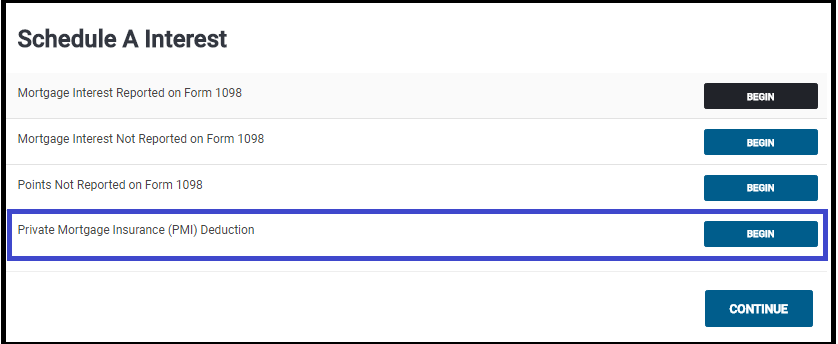
The Tuition and Fees option is located on the 8863 to allow you to determine which is better for your taxpayer.

PMI is located in the Mortage and Interest section of Itemized Deductions
Important Note:
Due to the recent passing of the Bipartisan Budget Act of 2018, certain expired federal provisions have been reinstated such as the Tuition and Fees deduction and the Mortgage Insurance premiums deduction. Each individual state will determine if and when they will conform with those federal changes. If you file a state return prior to the state making their decision to conform or not you may be required to file an amended return.”
TaxSlayer recommendation: Once we deliver these two items, we recommend that you create a return tag if the return has one of these two items in it and a state return. As of today, we do not know if the state(s) are going to adopt the extenders. Once your state makes a decision, you can run a “Tags report” and review the state returns to see if any adjustments need to be made.
Link to Post with State Extender Information
Blog posted 02/22/2018
Pro Online: Product Update Alert for Thursday, February 22nd at 5:00am ET
We will be placing returns in maintenance on Thursday, February 22nd at 5:00am ET to release a series of updates.
- Adding the extenders back into the software – Tuition and Fees Deduction and PMI
- Text update on the Federal Estimated Payment screen (Issue #1253)
- Fix for an issue with e-filing Application for Extensions (Issue #1000)
- Adding the below zip codes to the zip code database
- 19060 – Garnet Valley, PA
- 80951 – Colorado Springs, CO
Pro Online 2017: Taking the 933 Exclusion on the 1040
Before taking the Section 933 Exclusion for exempt PR income, be sure you have first reported the earned Puerto Rican sourced income so that the exclusion is reducing the applicable amount. To first report the Puerto Rican sourced income on Form 1040 from the Income menu go to “Other Income” > “Other Income Not Reported Elsewhere”. Enter the description as “Puerto Rican Earned Income” and then the dollar value. Once these steps have been taken, use the steps outlined below to claim the Section 933 Exclusion.
(1) Navigate to the Income Section
(2) Click begin on the Other Income Line

(3) Click Begin on the Compensation Line located on the Less Common Income menu

(4) Select Begin on the Section 933 Excluded Income from Puerto Rico

(5) Answer the Bona Fide Resident question

(6) Answering Yes displays an entry that allows you to enter the amount to exclude. Enter the amount and click Continue

(7) If you need to itemize deductions, navigate to Itemized Deductions. The screen will display the percentage amount that you can enter for each item based on the income exclusion

(8) The excluded amount will be subtracted on Line 21

blog posted 02/21/2018
Pro Online: New Dialog box when transmitting from Submission Page
We added a verification dialog box when “Save and Transmit” is selected on the submission page in e-file
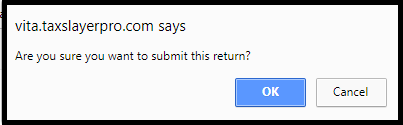
Click OK to submit the return
Click Cancel to return to the page and then select Save and Exit return
Reason: The boxes are the same color and similar size and returns were occasionally getting sent prematurely
Product Update Alert: Wednesday, February 21st at 5:00am ET
We will be placing the site in maintenance on Wednesday, February 21st at 5:00am ET to release a series of updates.
- Implementation of Section 933 for Puerto Rico exclusion of income on the Federal 1040.
- Will be located within “Other Compensation” menu inside of “Other Income”
- Addition of various zip codes to the zip code database
- 89521 – Reno, NV
- 89178 – Las Vegas, NV
- 95757 – Elk Grove, CA
- 28759 – Mills River, NC
- 85140 – San Tan Valley, AZ
- Fixed the issue where the 8888 wasn’t included in the PDF if a return was marked Paper Return with Direct Deposit and the refund was allocated between two or more banks.