Author Archives: %s

IR-2019-01: IRS Confirms Tax Filing Season to Begin January 28

07 Jan 19
Kim Manuel
No Comments

WASHINGTON ― Despite the government shutdown, the Internal Revenue Service today confirmed that it will process tax returns beginning January 28, 2019 and provide refunds to taxpayers as scheduled.

“We are committed to ensuring that taxpayers receive their refunds notwithstanding the government shutdown. I appreciate the hard work of the employees and their commitment to the taxpayers during this period,” said IRS Commissioner Chuck Rettig.

Congress directed the payment of all tax refunds through a permanent, indefinite appropriation (31 U.S.C. 1324), and the IRS has consistently been of the view that it has authority to pay refunds despite a lapse in annual appropriations. Although in 2011 the Office of Management and Budget (OMB) directed the IRS not to pay refunds during a lapse, OMB has reviewed the relevant law at Treasury’s request and concluded that IRS may pay tax refunds during a lapse.

The IRS will be recalling a significant portion of its workforce, currently furloughed as part of the government shutdown, to work. Additional details for the IRS filing season will be included in an updated FY2019 Lapsed Appropriations Contingency Plan to be released publicly in the coming days.

“IRS employees have been hard at work over the past year to implement the biggest tax law changes the nation has seen in more than 30 years,” said Rettig.

As in past years, the IRS will begin accepting and processing individual tax returns once the filing season begins. For taxpayers who usually file early in the year and have all of the needed documentation, there is no need to wait to file. They should file when they are ready to submit a complete and accurate tax return.

The filing deadline to submit 2018 tax returns is Monday, April 15, 2019 for most taxpayers. Because of the Patriots’ Day holiday on April 15 in Maine and Massachusetts and the Emancipation Day holiday on April 16 in the District of Columbia, taxpayers who live in Maine or Massachusetts have until April 17, 2019 to file their returns.

Software companies and tax professionals will be accepting and preparing tax returns before Jan. 28 and then will submit the returns when the IRS systems open later this month. The IRS strongly encourages people to file their tax returns electronically to minimize errors and for faster refunds.

Print Sets — Changes to accommodate new 1040 Post Card and Schedules

03 Jan 19
Kim Manuel
, , ,
No Comments

You will notice a few changes to the print sets that we have assigned.

Master Print has been renamed to 2018 TAXPAYER COPY PRINT and will print the 1040 and schedules stacked with the “do not mail” strip

Master Print (2 8879s) has been renamed to PY TAXPAYER COPY PRINT and will be used to print the taxpayer’s copy for all prior years so it will include the 2-page 1040 and only prints one 8879

Quality Review can currently be used for all years. When in prior years, it will include the 2-page 1040.  In 2018, it will include the 1040 and schedules stacked with the “do not mail” strip and will also include the new 1040 a second time.

We will also be creating and assigning a 4th print set this year 2018 PAPER FILE that will print the new 1040 and schedules as required by the IRS for the purpose of mailing a paper return to the IRS

Release Notes: Wednesday, December 26th 5:00 am Eastern

21 Dec 18
Kim Manuel
,
No Comments

We will be placing the returns in maintenance mode on Wednesday, December 26th at 5:00 am Eastern for a series of updates to include:

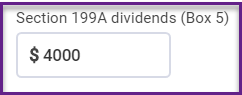
  • Adding the new line box 5 REIT dividends to the 1099 DIV menu (Part of tax reform)


*Click here to download a PDF of our Cumulative Release Notes.

Stress Test 2 Results

08 Dec 18
Kim Manuel
No Comments

We would like to thank the volunteers and TaxSlayer employees that participated in Saturday’s stress test.  We want to share the results:

Concurrent Users to simulate peak hour of tax season:

  • Goal: 8,000 – 10,000
  • Actual: 1,572

Returns prepared for the purpose of generating calculations and rendering PDFs

  • Goal:  24,000
  • Actual:  3,184

Stress Test Goals

08 Dec 18
Kim Manuel
No Comments

8,000 -10,000 users

24,000 returns prepared in 2018 between 11:00 am Eastern and 12:15 pm Eastern

Snapshot of where we are at:

Help us reach 106,905 returns by 12:15 pm Eastern


Stress Test Scenarios for Saturday, December 8th (Update)

08 Dec 18
Kim Manuel
,
No Comments

12:15 PM:  This concludes our TaxSlayer 2018 stress test.  Thank you so much for sharing part of your day with us.  You and everyone that participated in the first stress test, earned your “I made a difference” virtual button.

Please take a moment and share our experience with us.  Stress Test 2 Survey


—————————————————————–

12:10 PM:  We are now moving into the 5 minute stretch….Stay Calm and Stress On


12:00 PM:  Update on return volume created in the past hour:

Returns = 2,334

Shout Out to Philadelphia — #2 Stresser City at noon

___________________________________________________________________

11:55 AM:  We are back up to 1,500 users…New York City and taken back 2nd in the number of stressers participating today.


11:50 AM:  We are down tot he final 25 minutes of our Stress Test.  We really appreciate everyone who has taken the time to participate today and in our first stress test.  We will be posting a survey link at the conclusion of our stress event.

_________________________________________________________________________________


11:45 AM:  Woo hoo!!! Los Angeles…you rock with 80 Slayit Stressers….

Worcester…you are running in second place now

——————————————————————————————————————————————————————————

11:39 AM:  If you complete the scenarios below, we welcome you to stay on board with us until the conclusion of the Stress Test at 12:15 PM Eastern.  If you have worked through all of the scenarios below, be creative and complete the most complex return you can think of.

Update on Numbers:  Down to 1400 concurrent users

Up to 2,151 returns created since 11:00 am Eastern

We have also had 156 new Practice lab Accounts created since 11:00 am

——————————————————————————————————————————–

11:35 AM:  Friendly stressing competition between New York City and Los Angeles.  Los Angeles just took over the number 1 slot for users.  Come on New York…10 more people will move you back to the leader board……TaxSlayer’s friendly stress competition…

————————————————————————————————————————–

11:33 AM — Los  Angeles just moved up to our number 2 “Stressing with us” city this morning.  We are currently at 1,572 concurrent users…

———————————————————————————————————————-

11:31 AM –– Top 5 Stressing cities are:

New York

Albuquerque

Corpus Christi

Fort Myers

Virginia Beach

——————————————————————————————————————————————————————

11:28 AM – – Shout out our VITA sites in Puerto Rico for taking the time to stress with us this morning


11:23 AM — Awesome job, you all have created 1,533 returns in the past 23 minutes


11:18:  We are up to 1,503 concurrent users.  Give a shout out to all of your volunteers friends and family.  Our goal is to simulate peak hour which runs between 8,000 and 10,000 concurrent users.  This allows potential issues to identify themselves now and not on the first Saturday in February….Stress, Stress, Stress away today, so we don’t have to stress another day

______________________________________


11:15 am:  Group 4 may begin your test scenarios — We are currently at  1,352   users and have completed  1,100   returns


11:10 am:  Group 3 may begin your test scenarios — We are currently at 1,150 users and have completed 1,000 returns

————————————————————————————————————————————–

11:05 am  Group 2 may begin your test scenarios — We are currently at 833 users


11:00 am Group 1 may begin your test scenarios


We will begin in 5 minutes;


Each group will have an assigned time to begin the testing process and scenarios

  • Group A: Beginning character of Practice Lab Username: Any number or character – D   Begin 11;00 am Eastern
    • This includes users that have not established a username yet.
  • Group B: Beginning letter of Practice Lab Username: E –  J  Begin 11:05 am Eastern
  • Group C: Beginning letter of Practice Lab Username K –  R  Begin 11:10 am Eastern
  • Group D: Beginning letter of Practice Lab Username S – Z   Begin 11:15  am Eastern

Make notes of the Practice Lab 2018 behavior as you execute the following instructions – any slowdowns, difficulties opening returns; problems completing inputs, navigation issues, etc.:

Scenarios:

  1. Login to Practice Lab 2018
  2. Create a new return using Basic (No Profile) that has a minimum of 2 income documents from basic information through creating an e-file.
    • Save and Exit the return
  3. Open an existing return
    • Navigate to the Income Section and add an additional income document.
    • Navigate to Summary/Print and select View/Print Return.
    • Select Print your 2018 Tax Return to render the PDF.
    • Close the PDF.
    • Select Save & Exit Return
  4. Switch years to Practice Lab 2017
  5. Create a new return using Basic (No Profile) that has a minimum of 2 income documents.
    • Add a State (even if you don’t typically do state returns).
    • At a minimum, open Additions and Subtractions to Income menus, enter data and continue. This will kick off calculations within the state menu (new from last year’s stress test).
    • Generate the PDF of the state when you return to the state summary page.
  6. Switch years back to Practice Lab 2018
  7. Create a new return using Master Taxpayer Profile that has at least Interest and/or Dividends.
    • Generate the PDF for the Schedule B.
    • Navigate to Deductions and complete Itemized Deductions.
    • Generate the PDF for Itemized Deductions.
    • Save and exit the Return
  8. Select the Quality Review Print Set for a return in the client list.
    • Generate the PDF
    • Close the PDF
  9. Continue moving around within returns as you would experience at your site during tax season.  We want to keep as many volunteers active through entire stress test time period at 12:15 PM EST.

Practice Socials and EIN Guidance:  The Practice Lab automatically enforces 00 as the 4th and 5th digit of the taxpayer SSN when starting a return.  Even though this is a secured, practice environment, we recommend you use 00 as the 4th and 5th digit of any SSN in the return.  We also recommend that you use 00 as the 3rd and 4th digit of any EIN you are using.

Communications:  TaxSlayer will be communicating to testers through the VITA/TCE Blog and the message center.

Feedback:  We will post a link to a survey that will allow you to share your experiences with us.

The more you stress on Saturday, the less you stress in February

06 Dec 18
Kim Manuel
,
No Comments

When:  Saturday, December 8, 2018

Time:  11:00 am – 12: 15 PM Eastern

Where:  TaxSlayer Practice Lab 2018 from anywhere with an internet connection

Goals:

Users: 8,000 – 10,000 concurrent users to most closely simulate our peak hour during tax season

Return preparation:  24,000 returns prepared during the period

Identify Items:  Identify any items that need adjusting prior to busiest day of the tax season.  We cannot do this without your participation.

Account Hub: New Name, Fresh Look, existing functionality

05 Dec 18
Kim Manuel
, ,
No Comments

Selecting the My Account Login from the VITA/TCE Springboard will take you to a more modern version of My Account.

Note:  For now, it is going to take 30 – 90 seconds to render the login page.  We are aware and are working on a solution.

Login

You will use the same username and login credentials that you used for My Account.  If you have forgotten them, you follow the same forgot password process as usual.

Software Options

Select to download 2018, 2017, 2016 and/or 2015

Account History

Click View to display your EFIN Validation Code (required for completing desktop installation)

Account Information

Displays your email address, telephone number and allows you to update your password

Company Information

Allows you to view the information we have on file.  Changes made to this page have no impact on your Pro Online setup or how we have you setup in our system.

Changing your SIDN:  Email support

Changing your EFIN:  Contact your SPEC  Relationship Manager

Any changes you make to this page should also be emailed to your SPEC Relationship Manager so they can update the IRS Ordering System