Author Archives: %s

Pro Online: Change to Returns in Transmitted Status

02 Feb 18
Kim Manuel
, , ,
No Comments

We made a change to what the preparer can do with a return while it is in the status of “Transmitted”.  We removed the ability to open a return and make changes to it while it is in the status of “Transmitted”


The average turn around time for federal acknowledgements is 7 to 15 minutes.

How do I correct federal returns with validation errors because they stay in the transmitted status

Navigate to Rejected Clients on the Welcome Screen and select Validation errors.  A list of returns with outstanding federal validation errors will be listed.  Click Select to open the return

What if the return does not show up under validation errors?

We have not received an acknowledgement from the IRS.  You can still view the Client Status to see where the return is in the transmission process
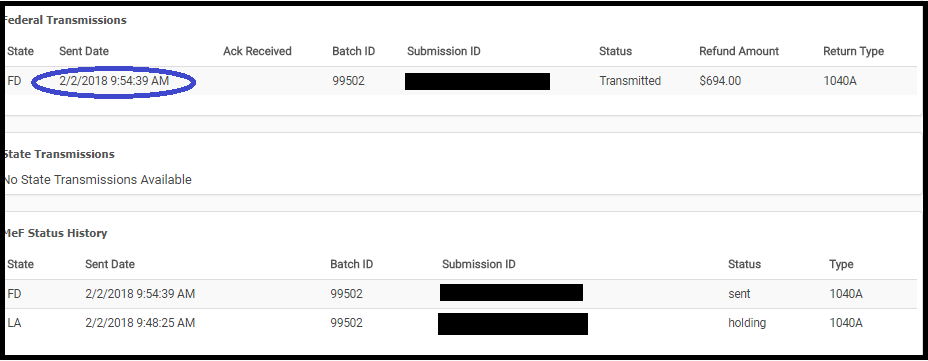
What if the return is a true State Only return and there was no federal filing requirement?

We will be making a modification to the status to indicate that it is a “State Only” return (where there was no federal return filed) to allow you to open it to make corrections to state rejects.

What about my 2015 returns that have a true validation error?

We will be adding an option to allow you entry into these returns from Rejected Clients.


IRS Reject: R0000-504-2

01 Feb 18
Kim Manuel
,
No Comments

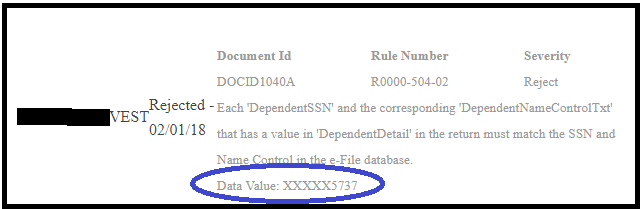
Scenario:  My return was rejected because the Dependent SSN does not match the Name Control on file with the IRS.

How do I know which dependent?  The IRS ack and the client status will display the last 4 digits of the SSN

Tip:  Verify that the information entered matches the information on the Social Security card to ensure there are no typographical errors,


Pro Online 2016/2015: Consent to Disclose Tax Return Information to VITA/TCE Tax Preparation Sites

01 Feb 18
Kim Manuel
,
No Comments

Scenario:  The Consent to Disclose Tax Return Information to VITA/TCE Tax Preparation Sites is showing up in my 2016 and 2015 return.

Why? The consents are currently designed to be year agnostic.  We are looking to modify this behavior in the future.

What do I do? Since the consent does not apply to the tax years 2016 and 2015, you can simply select deny, enter a PIN and date.

Blog Posted 02/01/2018

NY Reject R1122 (RESOLVED: ACTION REQUIRED)

01 Feb 18
Kim Manuel
No Comments

Resolved/Action Required

You can now resend NY returns rejected for R1122

(1) Select the return

(2) Navigate to the e-file page

(3) Select the Send State Only option  IMPORTANT:  The federal return type must be an e-file type

(5) Click through the warning message that the federal return will not be sent

(6) Select Save to navigate to the Transmission page

(7) Select Save and Transmit Return

Note:  If the federal return has been accepted, you must Save and Transmit the return from the Submission page.

~~~~~~ORIGINAL BLOG POST~~~~~~

Scenario:  You selected No Drivers License or State ID from the drop down list and receive the following reject

Reason:  The correct literal is not being sent in the state e-file

Solution:  We will correct this in an update.  Hold any rejects until we post that this has been resolved

Blog posted 01/31/2018

Product Update Alert: Friday, February 2 @ 5:00 am EST

01 Feb 18
Kim Manuel
No Comments

We will be putting the returns in maintenance mode at 5:00 am EST on Friday, February 2nd to apply a series of updates.  The update is scheduled to include:

  • Changes to enforce Send State Only returns to require a Federal return type
  • Pull forward the street address for he 1099-R during the Pull Data Forward Address
  • Preparer notes not displaying the date, time, and who entered information (Not deployed)
  • A fix for NY Direct Debit date to print the date selected for debit instead of the current date

Blog posted 02/01/2018 (and this time I remembered to push the publish button)

Illinois Reject Code: ILHEADER-2400-5 (RESOLVED:ACTION REQUIRED)

01 Feb 18
Kim Manuel
, ,
No Comments

Update 2/1  3:35 pm EST

Illinois has modified their business rule to accommodate the filing of returns without an EIN.  You can now resend the returns by doing the following:

(1) Select the return

(2) Navigate to the e-file page

(3) Select the Send State Only option  IMPORTANT:  The federal return type must be an e-file type

(5) Click through the warning message that the federal return will not be sent

(6) Select Save to navigate to the Transmission page

(7) Select Save and Transmit Return

Note:  If the federal return has been accepted, you must Save and Transmit the return from the Submission page.

Update 1/31 3:48 pm EST

This is a new business rule for the state this year.  We have reached out to state for further clarification

~~~~ original blog post~~~~

Scenario:  My Illinois return is rejected for the following:

REJECTPAID PREPARER FIRM FEIN (PREPARERFIRMEIN OR MISSINGEINREASONCD) MUST BE PRESENT WHEN PREPARERPERSONNM IS PRESENT AND SELFEMPLOYEDIND CHECKBOX IS BLANK

What to do:  Hold these returns for now

Solution:  We have this under review Issue ID 893

Pro Online 2017: MN Validation Error (RESOLVED: ACTION REQUIRED)

01 Feb 18
Kim Manuel
,
No Comments

Resolved

The validation error has been resolved.  However, you will need to wait until we have enabled “Send State Only” to resend the returns that received this validation error if the Federal return has already been accepted.

How do I know which returns had the validation error?

They are listed on Reports>Validation Errors


~~~~~Original Blog Post~~~~~

Scenario:  You receive the following state validation error for MN:

This has been reported to our state development team Issue ID 872

Blog posted 01/29/2018

Product Update Alert: Thursday, February 1st 5:00 am EST

01 Feb 18
Kim Manuel
No Comments

We will be putting the returns in maintenance mode at 5:00 on Thursday, February 1st to deliver a series of updates which is scheduled to include:

  • Removal of text on 1040NR Sch OI regarding exempt income
  • Not having to exit the return to see Disaster Area inputs
  • Error message on Form 8862
