Author Archives: %s

Volunteer Time: Question and Answers from Partner Call

05 Feb 18
Kim Manuel
No Comments

The following are questions and corresponding answers that we received on the Partner Call that was held on Thursday, February 1st.  We are posting the ones that are most applicable to all sites.

Q: When will the 2018 1040 ES be available in the software?

A:  The IRS has not released the 2018 1040-ES.  Currently the 2017 forms are still printing in the application.  Once the IRS releases the forms, we will make the appropriate updates to the application.  This impacts both ProOnline and Desktop.  The IRS issued a statement that is located under the IRS Alerts page on the blog.

Q:  Why do the Consent forms show up in prior years of Pro Online?

A:  The consents are currently not year specific, which populates them in all years.  For the prior years, you can select No, enter a PIN and a date to move through them.  We are looking at making these year specific, but it is most likely not something that will happen during tax season.

Q:  There are some prior year e-files that have been stuck in “transmitted” for quite a while.  Are you sending prior year returns and are you aware?

A:  At the time of the call, we did have prior year returns in the status of transmitted. A blog post was made at the request of the volunteer and we have since resolved this.

Q:  Concern was raised around navigating between the e-file section and return section because the left navigation bar changes.

A:  Last year we had a “back” button at the top of the e-file page once the user navigates through the warnings and validation errors pages.  We have put in a request to have this added to the top of the e-file page.  You can scroll to the bottom of the e-file page and click “Back” to return to the Summary/Print page

Q:  How can I review the EIC worksheet prior to completing the return

A:  You can review the EIC worksheet by selecting the print option when you are on the Summary/Print page.

Q:  Will the paper Carry Forward consents be available in different languages?

A:  The IRS will bring this up to the IRS Products team to see if there are any opportunities to accommodate this request.

 Q:  Are there any “Best practices” that can be shared about how to most efficiently handle the use of Carry Forward Consents?

A: The IRS discussed a few options that they have heard from the field

  • Some sites are placing the paper copy inside the Interview and Intake form for the taxpayer to review and sign while they are completing the intake form
  • Some sites are discussing and then turning the keyboard around for the taxpayer/spouse to enter the PIN and and date.  This prevents having to make paper copies.
  • The volunteer can choose the PIN if the paper copy was signed by the taxpayer
  • Review and become familiar with Pub. 4299, page 9 & 10

Q:  When will release notes be fully functional?

A:  We are successfully populating the ProWeb tab with release notes.  Our ultimate goal is to populate the Federal and State tabs as well.  We will also continue to use the blog because we can add screenshots.

Q: Why do notes carry forward from year to year

A:  A big request from the field when we enhanced our notes feature was for the notes to carry forward year over year.  Some sites are using these are reminders in case there are special circumstances with the taxpayers year over year.

Q:  We are having a hard time distinguishing between last years notes and this years note.  Do you have any recommendations.

A:  We are looking at making sure the notes show a date and time stamp.  However, during the meantime a best practice may be to enter the year at the very beginning of the note to make it easier for the quality reviewer, or delete the older notes when you go in to add a new one.

Q:  Where is the direct debit information printed on the return?

A:  It is printed on the Client List form, which is currently in the Quality Review print set.  An alternative to pulling this up and just printing out the page, would be to create a Direct Debit print set that just has the Client List Form in it.  This would allow you to print the tax return as normal and then for those taxpayers using direct debit, you can choose that print set and it will just generate a PDF with the Client list form in it.  You can then print the entire Client List for or the page the information is listed on.

Q:  Does TaxSlayer Pro Online handle the tax returns needed for the displaced victims of Puerto Rico?

A:  Currently the 1040PR has the disaster area items incorporated into it.  We are in the process of completing the 933 exclusion that will be needed for the Puerto Rico residents that need to file a 1040 return and exclude Puerto Rican income.


Pro Online: New “State Only” Status

05 Feb 18
Kim Manuel
,
No Comments

The client list has a new status that you can filter returns on:   “State Only”

Can I filter my client list on the State Only status?

Yes

When will the State Only status display?

When you have electronically filed a state WITHOUT filing the federal return

Will the State Only status change when the state is accepted or rejected?

Updated 2/21:  Yes, the status will change to the final status of the state only return.  Accepted or Rejected

Blog posted 02/05/2018


Product Update Alert: Monday, February 5, 2018 5:00 am EST

04 Feb 18
Kim Manuel
, , ,
No Comments

We will be putting the returns in maintenance mode on Monday, February 5th at 5:00 am for a series of updates.  The updates is scheduled to include:

  • PA – A fix for the PA Schedule UE
  • LA – Fixed an issue where Line 5a of LA Schedule E was not populating on the print
  • Site Production Detail Report (both Electronic and Paper) were yielding zero results. This is now fixed
  • WI – Fixed an issue where the zip code entry for Private School Tuition Credit was not saving
  • RI – Fix to check the Retirement Modification qualifications when subtracting certain retirement income
  • AZ – Form 340 is now an available form to include a print set option for AZ returns
  • CA – Fixed an issue that was keeping CA Schedule X from generating in the return.

Blog posted 02/04/2018  3:42 pm EST


Sporadic Unexpected Server Errors (RESOLVED)

03 Feb 18
Kim Manuel
No Comments

Update 6:07 pm EST:  We pulled 1 server out of rotation that was generating this error.

We are experiencing sporadic “Unexpected server errors”.  If you get this, close the instance of your browser, and open a new browser (not just your tab).  We are actively looking at this.

Pro Online: Printing is not rendering and states not loading/slowness (RESOLVED)

03 Feb 18
Kim Manuel
No Comments

3:15 pm EST:  All servers are out of maintenance mode.  If you are still getting the Maintenance gears, you will want to log out, close the browser (not just the tab), and log back in.  We will continue to monitor the changes that were implemented throughout the evening.  The refund/balance due monitor will remain off in 2017 while we continue to evaluate the system.

3:00 pm EST:  For users that are hitting active servers and in a return, you will be able to render a PDF, calculate the return, and efile the return as normal.  You are currently not seeing the calculations that appear on the right side of the return.

2:53 pm EST:  We are bringing another set of servers out of maintenance mode.  You may still see the maintenance window for returns if you are not connected to an active server.  You may have some workstations at your site able to prepare returns and some still hitting the servers still in maintenance mode.

2:50 pm EST:  We are bringing another set of servers out of maintenance mode.  You may still see the maintenance window for returns if you are not connected to an active server.

2:44pm EST:  We are bringing another set of servers out of maintenance mode

2:35 pm EST:  If you were in a return when we put the site in maintenance mode, we recommend you logging out, closing the browser and starting a new instance of the browser.

2:33pm EST:  Please hold off on submitting e-files until we notify everyone that all servers are online

2:29:  We are bringing the returns out of maintenance mode a few servers at at time.  You may see maintenance pages at various sites if you get switched to a different server while navigating through the return.

2:08 pm EST:  The returns are currently in maintenance to make some deploys to resolve the issue issue being experienced

2:00 pm EST:  We are putting the site in maintenance mode:

1:46 pm EST:  We will be putting the site in maintenance mode from  2:00 – 2:30 to move to a new message queue

1:38 pm EST:  Sorry for the delay as I was getting additional information from the team.  We are actively working to get the message queue online.  You should be able to navigate a little faster at this point, but you still cannot render calculations, prints or e-file.  In the event we need to move to another message queue we will put the time in temporary maintenance (no definite decision on this yet).

1:14 pm EST:  The queues are still in the process of coming back online

1:01 pm EST:  We are in the process of restarting some of the queues which is causing the backlog and slowness

12:52 pm EST:  We are still actively working this issue.  I will keep the blog updated every few minutes

12:42 pm EST:  Clicking Forgot Password and change Password is rendering an unexpected error.

12:28pm EST:  This is also causing the you to not be able to move between the pages.  If you are stuck in a spinning situation, click on the personal information section on the left navigation bar to leave the calculation cycle.

We are actively working to determine why the calculations are backing up which is making the site render slowly.  This is most likely causing your state menus to not load.  If you are stuck in a spinning situation, click on the personal information section on the left navigation bar to leave the calculation cycle.


We are aware and looking to resolve.

Quality Alert from SPEC Headquarters: 2018 Form 1040-ES

02 Feb 18
Kim Manuel
,
No Comments

Background: The IRS is continuing to update its programming and processing systems for some 2018 forms impacted by the Tax Reform Act.  This includes Form 1040-ES, Estimated Tax for Individuals, for all software vendors.  IRS expects to release this form to software vendor in mid-February.

Once the form is released TaxSlayer will update the software with the correct 2018 Form 1040-ES.  Until this form is released by IRS, VITA/TCE sites should not provide the 2017 coupons currently printing from the software to the taxpayer.

Message to the Taxpayer: Inform taxpayers that the 2018 1040-ES is not currently available from IRS due to the recent tax law changes and to check IRS.gov in late February to obtain the 2018 copy. Estimated payments are due quarterly so the first payment for the year is not due until April 15. So, there is time to determine the amount of your estimated payments.

Estimated payments are due on the 15th of April, June, September and January of the following year. Note: If these due dates fall on a Saturday, Sunday or legal holiday, the payments are due the next business day. Once available you may send estimated tax payments with the 2018 Form 1040-ES, pay online at https://www.irs.gov/payments, or from a mobile device using the IRS2Go app.

Thank you for your patience and continued support as we work through this process together.

Pro Online: Change to Returns in Transmitted Status

02 Feb 18
Kim Manuel
, , ,
No Comments

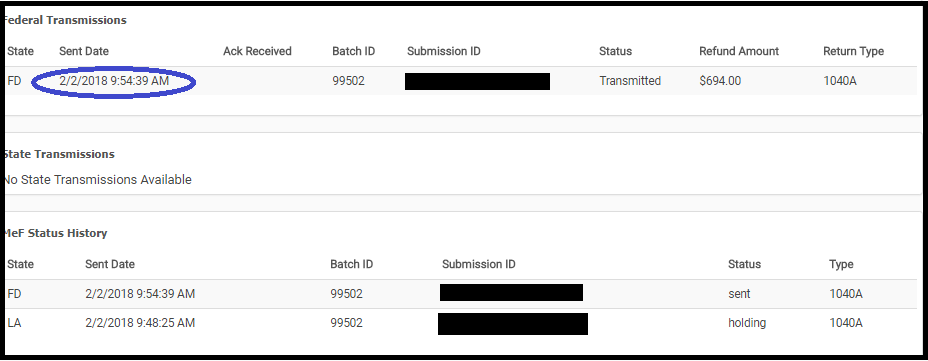
We made a change to what the preparer can do with a return while it is in the status of “Transmitted”.  We removed the ability to open a return and make changes to it while it is in the status of “Transmitted”


The average turn around time for federal acknowledgements is 7 to 15 minutes.

How do I correct federal returns with validation errors because they stay in the transmitted status

Navigate to Rejected Clients on the Welcome Screen and select Validation errors.  A list of returns with outstanding federal validation errors will be listed.  Click Select to open the return

What if the return does not show up under validation errors?

We have not received an acknowledgement from the IRS.  You can still view the Client Status to see where the return is in the transmission process

What if the return is a true State Only return and there was no federal filing requirement?

We will be making a modification to the status to indicate that it is a “State Only” return (where there was no federal return filed) to allow you to open it to make corrections to state rejects.

What about my 2015 returns that have a true validation error?

We will be adding an option to allow you entry into these returns from Rejected Clients.


IRS Reject: R0000-504-2

01 Feb 18
Kim Manuel
,
No Comments

Scenario:  My return was rejected because the Dependent SSN does not match the Name Control on file with the IRS.

How do I know which dependent?  The IRS ack and the client status will display the last 4 digits of the SSN

Tip:  Verify that the information entered matches the information on the Social Security card to ensure there are no typographical errors,