Author Archives: %s

Product Update Alert: Detailed information for January 12th Update

11 Jan 18
Kim Manuel
, ,
No Comments

We will be putting the returns in maintenance mode on Friday, January 12th at 5:00 am Eastern to perform a series of updates.  This update will include:

  • Phase II of the addition of the Affordability Worksheet
  • Removal of Tuition and fees that expired
  • Color correction on Begin/Edit buttons in the state modules
  • Correction to the Healthcare exemption screen when 0 months of healthcare is indicated
  • Correction to the display of the dependent information on the Household Members section of the Healthcare section
    • Existing Dependent/Household member entries prior to the fix may have to be deleted and re-added.
    • It will not be an issue for returns started today or after or for new dependents/household members added today and after on existing returns started prior to the fix.

Practice Lab 2017: Global Carry Forward Consent

11 Jan 18
Kim Manuel
No Comments

1/12/18

UPDATE: The Global Carry Forward Consent text may be changing over the next few days while final adjustments are being made.

Note: Two issues related to consents are actively being worked.

  1. If a consent is marked as DENIED, the PDF indicates “authorized” as if consent had been GRANTED.
  2. If MFJ, consents are not validating a required entry for the Spouse PIN/DATE (RESOLVED)

1/11/18 

Global Consent in Practice Lab:  Reminder that it is still under construction.  The language is currently displaying out of order, but printing in the correct order in the PDF.

Group Level Logins: MSA and Relational Assigned Tags

10 Jan 18
Kim Manuel
, ,
No Comments

Assigned Tags will not show up under Configuration>>Tags at the site they are assigned to.  This is a change from last year.  Tags now behave in the same manner as assigned Security Templates.

The assigned tags will be displayed in the following locations:

(1) Client List when you select the Tag icon

(2) The submission page in the e-file section.


These two sections will show the tags assigned to the site and the tags created at the site.

Note:  The only tags visible under Configuration>>Tags are the ones created at the site level.

Pro Online: Adding Consents, Taxpayer Profiles and Custom Credits (Resolved)

09 Jan 18
Kim Manuel
, ,
No Comments

01/10/2018 — The add buttons are now visible again

The Add button is currently not visible in these items through Configuration.  We will resolve this with an application update.

Blog posted 01/09/2018

Practice Lab/Pro Online: Introducing the Forms Completed Feature (Phase I)

09 Jan 18
Kim Manuel
, , ,
No Comments

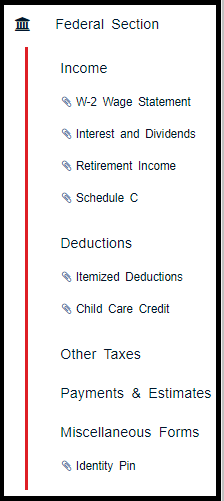
The left navigation bar now reflects the entry forms that have been completed during return preparation.

This will allow the quality reviewer the ability to quickly navigate through the entry forms that were completed during tax preparation by clicking down the displayed items under each Federal Section

See example below:

Note:  We are experiencing the tagged completed entries disappearing if you add an additional form.  We will be working to resolve this over the next couple of weeks.  Our goal for Phase I delivery is to allow you to get a feel for the new feature and allow you to work it into your Quality Review Process.

This seems to be happening in Chrome and not in Internet Explorer

Practice Lab 2017: Prompted to change password

04 Jan 18
Kim Manuel

No Comments

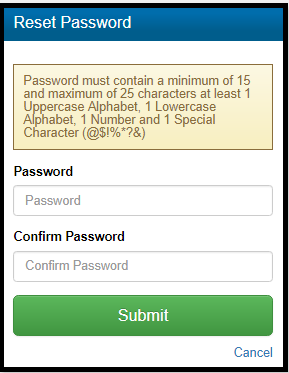
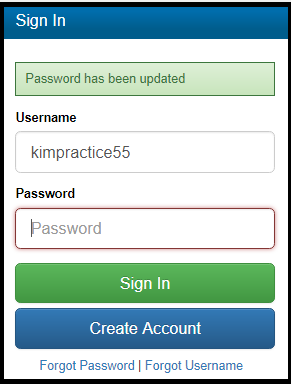
Below are screenshots of the new password requirements for the Practice Lab.  You will be automatically prompted to change your password if the password was not established prior to January 3, 2018.

Password prompt with new password requirements

Password screen confirming the password has been updated

Note:  This does not impact your production logins because your production site logins use Multi Factor Authentication (MFA)

What if I changed my password to a 15 character strong password prior to January 3rd?

You will still be prompted to change the password.  You can recycle the password if it meets the minimum requirements.

Blog posted 01/04/2018

Practice Lab 2017: 1040 View updated to 2017

04 Jan 18
Kim Manuel
,
No Comments

The 1040 view has been updated to reflect 2017

Practice Lab: Password Requirements Clarification

14 Dec 17
Kim Manuel

No Comments

Point of clarification:  The password is a minimum of 15 characters (not specifically 15 characters).  It must be a strong password with at least 1 Upper case letter, 1 lower case letter, 1 number, and one of the special characters that you typically use in your production password.

When:  January 1, 2018

What:  The password requirements for the Practice Lab will require users to have a strong password with a minimum of 15 characters.

How does this impact existing Users?  Existing users whose current password does NOT meet the new requirement will be prompted to change their password to a strong password with a minimum of 15 characters the first time they login to the Practice Lab beginning January 1, 2018

How does this impact new users?  New users creating accounts beginning January 1, 2018 will be required to enter a strong password with a minimum of 15 characters.

Does this impact my production username and password?  No.  The requirements for your production passwords will not change because you are required to authenticate via Multi-Factor Authentication (MFA).

blog posted 12/14/2017