Category: Software News

Product Update Alert: Monday, February 5, 2018 5:00 am EST

04 Feb 18
Kim Manuel
, , ,
No Comments

We will be putting the returns in maintenance mode on Monday, February 5th at 5:00 am for a series of updates.  The updates is scheduled to include:

  • PA – A fix for the PA Schedule UE
  • LA – Fixed an issue where Line 5a of LA Schedule E was not populating on the print
  • Site Production Detail Report (both Electronic and Paper) were yielding zero results. This is now fixed
  • WI – Fixed an issue where the zip code entry for Private School Tuition Credit was not saving
  • RI – Fix to check the Retirement Modification qualifications when subtracting certain retirement income
  • AZ – Form 340 is now an available form to include a print set option for AZ returns
  • CA – Fixed an issue that was keeping CA Schedule X from generating in the return.

Blog posted 02/04/2018  3:42 pm EST


Pro Online: Change to Returns in Transmitted Status

02 Feb 18
Kim Manuel
, , ,
No Comments

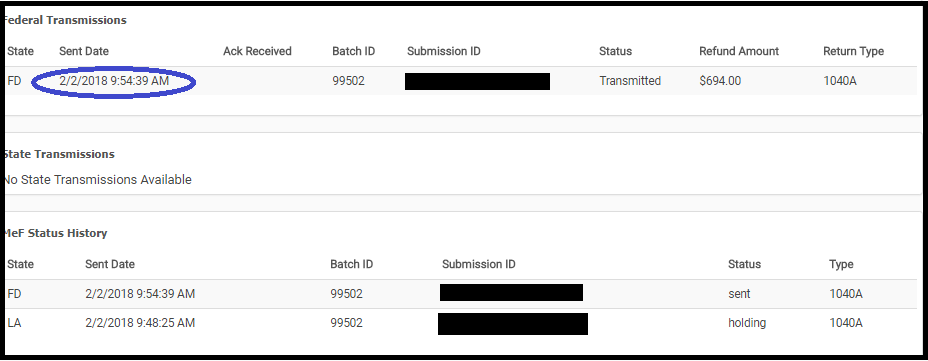
We made a change to what the preparer can do with a return while it is in the status of “Transmitted”.  We removed the ability to open a return and make changes to it while it is in the status of “Transmitted”


The average turn around time for federal acknowledgements is 7 to 15 minutes.

How do I correct federal returns with validation errors because they stay in the transmitted status

Navigate to Rejected Clients on the Welcome Screen and select Validation errors.  A list of returns with outstanding federal validation errors will be listed.  Click Select to open the return

What if the return does not show up under validation errors?

We have not received an acknowledgement from the IRS.  You can still view the Client Status to see where the return is in the transmission process
What if the return is a true State Only return and there was no federal filing requirement?

We will be making a modification to the status to indicate that it is a “State Only” return (where there was no federal return filed) to allow you to open it to make corrections to state rejects.

What about my 2015 returns that have a true validation error?

We will be adding an option to allow you entry into these returns from Rejected Clients.



IRS Reject: R0000-504-2

01 Feb 18
Kim Manuel
,
No Comments

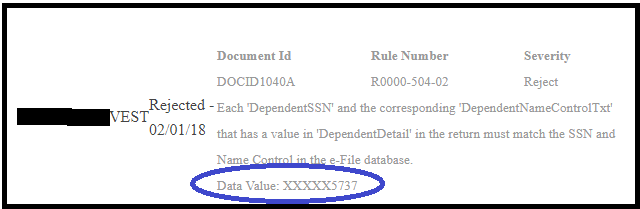
Scenario:  My return was rejected because the Dependent SSN does not match the Name Control on file with the IRS.

How do I know which dependent?  The IRS ack and the client status will display the last 4 digits of the SSN

Tip:  Verify that the information entered matches the information on the Social Security card to ensure there are no typographical errors,


Pro Online 2016/2015: Consent to Disclose Tax Return Information to VITA/TCE Tax Preparation Sites

01 Feb 18
Kim Manuel
,
No Comments

Scenario:  The Consent to Disclose Tax Return Information to VITA/TCE Tax Preparation Sites is showing up in my 2016 and 2015 return.

Why? The consents are currently designed to be year agnostic.  We are looking to modify this behavior in the future.

What do I do? Since the consent does not apply to the tax years 2016 and 2015, you can simply select deny, enter a PIN and date.

Blog Posted 02/01/2018

Product Update Alert: Friday, February 2 @ 5:00 am EST

01 Feb 18
Kim Manuel
No Comments

We will be putting the returns in maintenance mode at 5:00 am EST on Friday, February 2nd to apply a series of updates.  The update is scheduled to include:

  • Changes to enforce Send State Only returns to require a Federal return type
  • Pull forward the street address for he 1099-R during the Pull Data Forward Address
  • Preparer notes not displaying the date, time, and who entered information (Not deployed)
  • A fix for NY Direct Debit date to print the date selected for debit instead of the current date

Blog posted 02/01/2018 (and this time I remembered to push the publish button)

Product Update Alert: Thursday, February 1st 5:00 am EST

01 Feb 18
Kim Manuel
No Comments

We will be putting the returns in maintenance mode at 5:00 on Thursday, February 1st to deliver a series of updates which is scheduled to include:

  • Removal of text on 1040NR Sch OI regarding exempt income
  • Not having to exit the return to see Disaster Area inputs
  • Error message on Form 8862

Pro Online: Activating Users at Active Sites

31 Jan 18
Kim Manuel

No Comments

Scenario:

Craig is a user at Kim’s Sample VITA/TCE Site.  His username is marked as Inactive, so he is getting the message that his username is inactive when he tries to login.

What should Craig do?

Craig should contact his site administrator.  I may have made Craig inactive for a very specific reason.  TaxSlayer support WILL NOT activate a user at a site that is not the Site Administrator.

Blog posted 01/31/2018


Pro Online 2017: Where does Direct Debit Information Print

31 Jan 18
Kim Manuel
,
No Comments

Scenario:  The tax return has a balance due and a federal return option for Direct Debit is used.

The direct debit information prints on the Client Form Listing Summary in the Quality Review print set.  You can create a custom print set at your sites and include this form.  If the return falls into this scenario, you can select the custom print set that will print the information with the return.

An alternative solution would be to generate the Quality Review PDF and print the page that displays this information and give it to the client.

Below is an example of the form you would choose to include in a custom print set

blog posted 01/31/2018