Tag: Multi-Factor Authentication

MFA: Do I have to authenticate for each tax year? (Series 3, Part 3)

14 Sep 17
Kim Manuel
,
No Comments

Q1:  Am I authenticating for all tax years?

A1:  Yes, you are authenticating to login to the application.  If your security template allows you to have access to all years, the authentication applies to any tax year you have access to.

Q2:  Will the roll out of TaxSlayer Pro Online 2017 trigger MFA?

A2:  No, unless this coincides with the expiration of your existing authentication.


Blog Posted 09/14/2017

MFA: How should I handle my Multi-site login (Series 3, Part 2)

13 Sep 17
Kim Manuel
,
No Comments

Scenario:  I have a multi-site or relational login assigned to me so I can manage other sites.  I also have a site login for my production site(s)

Q1:  Which username should I login with first?

A1:   You should login with the username associated with your production site.  Once you do this, you will need to access the Preparer(s) Menu setup page and select the box to allow for multiple usernames to be associated with your email address.

Q2:  I completed the Account Update page for my multi-site or relational login first and do not have the ability to select the “Allow multiple accounts” checkbox.  What should I do?

A2:  You will need to contact support via email with your multi-site or relational login username so they can mark the selection that will allow you to utilize your email address for multiple usernames.

Blog posted 09/13/2017

MFA: Security Code and Security Questions (Series 2, Part 6)

12 Sep 17
Kim Manuel
, ,
No Comments

The following two items will no longer be applicable and will be removed from the application prior to the roll out of TaxSlayer Pro Online 2017:

  1.  The Security Code will be removed from the Login page and from Office Setup
  2.  The Security Question and Answer will be removed from the Preparer(s) Setup Menu because the user will be required to authenticate when they use the “Forgot Password” feature


Blog Posted 09/12/2017

MFA: Scenarios from the Field (Series 3, Part 1)

11 Sep 17
Kim Manuel
,
No Comments

Series 3 starts a series on scenarios and questions we are receiving via support calls and emails.

Scenario:   A person volunteers on Monday, but the volunteer is off on Tuesday and the site admin sets that volunteer as inactive until they come back to the site on Wednesday.

Q:  Does deactivating and reactivating a user have any impact on when MFA is triggered assuming the volunteer is using the same device?

A:  Deactivating and reactivating a user does not trigger MFA, unless the volunteer is outside of their designated time period for their authentication code expiring.

Blog Posted 09/11/2017

MFA: When Can an E-mail Address be used across Multiple Usernames (Series 2, Part 5)

08 Sep 17
Craig Smith
,
No Comments

One of the common questions received yesterday (9/7/17) after launching MFA was from site administrators or volunteers with a security template allowing access to Configuration>Preparer Setup.

Scenario: I have multiple volunteers at my site that also volunteer at other sites. When I access my own Preparer(s) Setup Menu page, I can see the checkbox to allow my e-mail address to be used across multiple accounts. However, when I access the Preparer(s) Setup Menu page for other volunteers at my site, I do not see the checkbox under their e-mail address entry field.

Q1:  Why can’t I see the checkbox for my volunteers?

A1: The reason you are able to see the checkbox under your Preparer(s) Setup Menu page is because you completed the Account Update screen after MFA was launched.  As each volunteer completes the Account Update screen for their username, the checkbox will be available within their Preparer(s) Setup Menu page.

MFA: Three invalid login attempts will trigger authentication (Series 2, Part 4)

08 Sep 17
Kim Manuel
,
No Comments

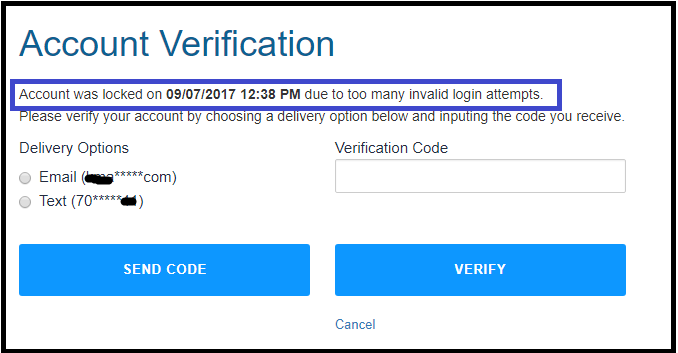
One of the actions that requires a user to get a new authorization code is three invalid login attempts.  Part of the new mandates from the IRS Security Working Group is to “lock accounts” after three unsuccessful login attempts to ensure that someone other than the user is not attempting to hijack the login credentials.

Below is the Account Verification box that will appear after three unsuccessful login attempts:

Instructions for logging in:

(1) Select your delivery option…note:  If you only have an email address on file, you will only have the option of email.

(2) Select Send Code

(3) Enter your verification code

(4) Select Verify

(5) Follow the on screen prompts to enter and verify a new password

(6) Login with your newly established password


Blog posted 09/08/2017  7:53 AM Eastern

MFA: Notifications that something is not unique (Series 2, Part 2) Updated 10/18

07 Sep 17
Kim Manuel
,
No Comments

Email addresses and cell phone numbers can be designated as being able to be used by multiple usernames by a user that has the privileges of accessing Configuration>>Preparer(s) Menu and making a designation for the email address (see below).
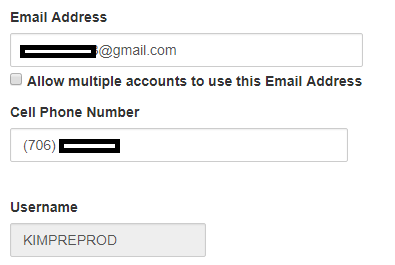
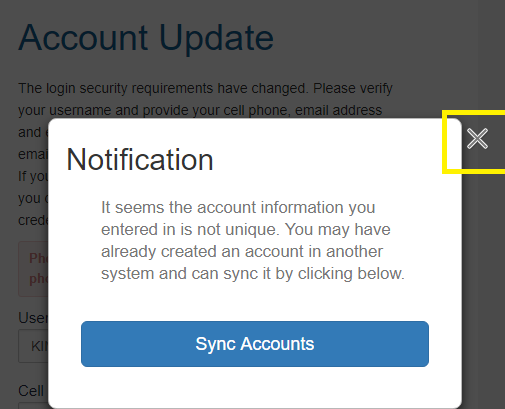
If you have multiple usernames and are in the process of completing the Account Update page you will get the following notification box if something you entered is not unique (primarily seeing this for cell phone number).  If you are getting this on an email address, then see information above.

Updated 10/18/2017:  This dialog box no longer exists

You will see a Unique Notification dialog box.  Click the X — DO NOT click Sync Accounts.  This is a service for our commercial accounts that have to login to multiple programs other than just Pro Online to create a single sign-in.  This does not apply to VITA/TCA because we incorporate things like Management Reports into the application.
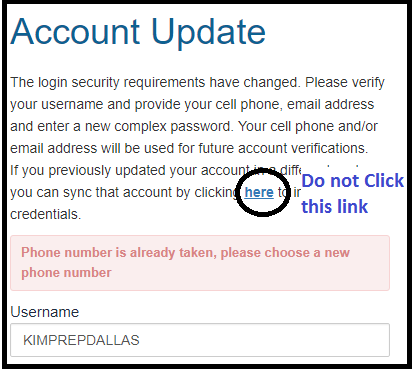
Closing this dialog box will allow you to see what field is not unique…see example below of the cell phone number not being unique because I have already used it on another one of my user names.  My only option for receiving my authentication code for multiple user names is via Email.  Also, clicking the link in the Account Update message is not applicable to VITA/TCE.
Blog Posted 09/07/2017  11:07 AM Eastern


MFA: Account Update is now in effect (Series 2, Part 1)

07 Sep 17
Kim Manuel
,
No Comments

The Account Update page is now in effect.  The screen is different than the original screen we blogged about.  You will be required to enter and confirm the following information:

  • cell phone (Optional, not required…this was resolved from an earlier status of it being required)
  • email address (remember, if it is going to be used for multiple users, a user with privileges to access Preparer(s) menu must mark the box to allow multiple usernames for the email account)
  • Password

Blog Posted 09/07/2017  8:02 AM Eastern