Tag: Practice Lab

Pro Online: Product Update Alert: Thursday, January 18th Update information

17 Jan 18
Kim Manuel
, ,
No Comments

We will be putting returns and site in maintenance mode to apply a series of updated on Thursday, January 18th at 5:00am Eastern. This round of updates is scheduled to include the below items:

  • Allowing the preparer to use the (.) period on state percentages when using Internet Explorer
  • Solution for Global Carry Forward Pilot program
  • ACA — Resolve the dependent difference in taxable and non-taxable income not being added to Dependents MAGI
  • Reactivate Return
  • F2441 – Marking a Child Care Provider as tax-exempt for Hawaii no longer requires the HI 12-digit tax ID number.


Pro Online: Production Update Alert – January 17th at 5:00am Eastern

16 Jan 18
Craig Smith
, ,
No Comments

We will be putting returns in maintenance mode to apply a series of updated on Wednesday, January 17th at 5:00am Eastern. This round of updates is scheduled to include the below items:

  • Long-term Care Insurance Premium – Fix for a validation that is occurring when attempting to edit/review original LTC Premium entries within the Itemized Deduction menu
  • Various text updates specific to 2017
  • Health Insurance – A fix for an error occurring when a Household member is added within the Health Insurance menu with zero (0) months of coverage
  • Health Insurance – A fix for a validation error occurring at e-file when marking a dependent as “Not a dependent” that is blocking access to the e-file menu. The program is incorrectly indicating the “Non” dependent must be included for Health Insurance
  • Mortgage Insurance Premium Deduction – Due to recently expiring the PMI deduction within the Mortgage Interest menu will be removed

Product Update Alert: Monday, January 15th at 5:00 am Eastern

14 Jan 18
Kim Manuel
,
No Comments

We will be putting the returns in maintenance mode on Monday, January 15th at 5:00 am Eastern for a series of updates in preparation of turning on Start a New Return on Tuesday. Items pushed out impacting TaxSlayer Pro Online are:

  • Form 8606 Entry Screen – Updated references pertaining to the current tax season
  • W-2, Box 14 – Removed the “S” from “KPERS” for Kansas Public Employee Retirement System
  • Various updates related to software used by FSA sites with self-prep kiosks

Blog posted 01/14/2018  4:44 pm Eastern

Product Update Alert: Detailed information for January 12th Update

11 Jan 18
Kim Manuel
, ,
No Comments

We will be putting the returns in maintenance mode on Friday, January 12th at 5:00 am Eastern to perform a series of updates.  This update will include:

  • Phase II of the addition of the Affordability Worksheet
  • Removal of Tuition and fees that expired
  • Color correction on Begin/Edit buttons in the state modules
  • Correction to the Healthcare exemption screen when 0 months of healthcare is indicated
  • Correction to the display of the dependent information on the Household Members section of the Healthcare section
    • Existing Dependent/Household member entries prior to the fix may have to be deleted and re-added.
    • It will not be an issue for returns started today or after or for new dependents/household members added today and after on existing returns started prior to the fix.

LIVE: Health Insurance – Affordability Worksheet – Phase II

11 Jan 18
Craig Smith
, , ,
No Comments

We are excited to announce that the addition of the Affordability Worksheet (Phase II of Health Insurance redesign) will be released soon (tomorrow that is – 1/12/18)! Click here  to then download a PDF providing additional information regarding the implementation of the Affordability Worksheet. The PDF will be found on the left-hand navigation bar after clicking the link.

Remember, the intent on the redesign after adding the Affordability Worksheet is specific to the order in which claiming exemptions is presented to the user. Previously, the determination to claim the affordability exemption was presented too early in the Health Insurance menu way before users had the opportunity to claim other coverage exemptions that applied (causing increased legwork on the preparer). The general order for claiming exemptions for not having Health Insurance is as follows:

  1. Program first determines if “Household or Gross Income below Filing Threshold” exemption applies
    • If the return qualifies, exemption is applied to the return and the Health Insurance menu is complete
    • If the return does not qualify, move to Step 2.
  2. Preparer is now asked if any household members received a Marketplace Issued Exemption Certificate or qualifies to claim another coverage exemptions besides affordability
    • If the household members came to your site with a Marketplace Issued Exemption Certificate or qualified for another coverage exemption, this information can be entered into the program and applied accordingly to each applicable household member
  3. If a Marketplace Issued Exemption Certificate was not received (or will not be applied for) and another coverage exemption does not qualify, the preparer can then make the determination to see if the “Coverage is Considered Unaffordable” applies and are then taken through those steps.

Pro Online: State Programs – Negative Value Entries

11 Jan 18
Craig Smith
, ,
No Comments

We have received a few issues reported in various states where an entry field acknowleding users can enter a +/- value is not allowing a negative entry (most commonly used when subtraction retirement income, military pay, etc.). This particular issue is across all states and not specific to just a few states. With that said, we are actively investigating to provide a quick resolve but in the meantime, there is a current work around that will allow negative entries to be captured.

For example, if you are looking to subtract $10,000 in a state return, your thinking will have you enter the negative sign “-“ then the amount (-10000). This is currently validating and not being allowed. The workaround would be to enter at least the first two digits (10 in this example) then using your mouse, click to move the cursor in front of the first digit (1 in this example) then you can then enter the “-“ sign. You can also use the “HOME” key on your keyboard for the same result.

Internet Explorer Specific: The negative sign “-“ that must be entered using the above steps must be the one located on the main keyboard to the left of the Backspace button and NOT the “-“ located on the number keypad.
Pro Online: Return Prep Maintenance Alert – 1/9/18 (COMPLETE)

09 Jan 18
Craig Smith
,
No Comments

1/9/18 – 8:40am ET

Return preparation is now out of maintenance as new UI/UX updates were released (User Interface, User Experience).

  • The pill shaped buttons are now rectangle in shape and a little larger
  • The navigational buttons (Edit, Begin, Enter Myself, etc.) are darker in color with white wording
  • When on Summary/Print the left navigation bar is collapsed (previous behavior) but instead of clicking the “Expand” arrows, simply hovering your mouse over the left navigation bar will automatically expand the menu

1/9/18 – 8:18am ET

The site (only return preparation) will be placed into maintenance mode for about 30 minutes beginning at 8:20am ET. This maintenance window will be complete prior to 9:00am ET. This will only impact return preparation.

Practice Lab/Pro Online: Introducing the Forms Completed Feature (Phase I)

09 Jan 18
Kim Manuel
, , ,
No Comments

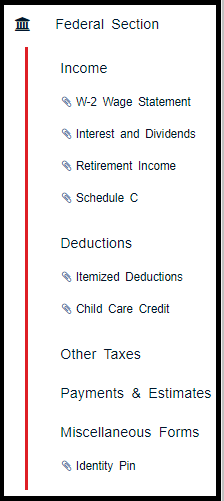
The left navigation bar now reflects the entry forms that have been completed during return preparation.

This will allow the quality reviewer the ability to quickly navigate through the entry forms that were completed during tax preparation by clicking down the displayed items under each Federal Section

See example below:

Note:  We are experiencing the tagged completed entries disappearing if you add an additional form.  We will be working to resolve this over the next couple of weeks.  Our goal for Phase I delivery is to allow you to get a feel for the new feature and allow you to work it into your Quality Review Process.

This seems to be happening in Chrome and not in Internet Explorer