Tag: Practice Lab

Pro Online: Forgot Username Link

16 Nov 17
Kim Manuel
,
No Comments

The Forgot Username link associated with the Pro Online login only emails usernames that have completed the Account Update page or were created after the roll out of MFA in early September.

Scenario:  I am returning volunteer and do not remember the username that I used last year to prepare returns.  How do I retrieve it?

You will need to contact your site administrator.  They can ensure that your username is still active at the site, update your user account with any changed information and provide you with the username(s) they have established for you at the site.

Can TaxSlayer support update my information and give me my username?

No.  The support team does not have a listing of the users that will be volunteering at the site for the upcoming season.

If I do not know my username, how can I complete the returns for my certification test?

You will login with your Practice Lab username and password to complete your certification test.  Start New Returns for 2017 is not turned on at any other site to prevent practice returns from being intermingled with production returns.  If you have forgotten your Practice Lab username, select Practice Lab from the VITA/TCE Springboard and select the Practice Lab block.  Enter the generic Password (same as last year).  Select the forgot username link, enter the email address that you entered when you created your Practice Lab account and click Submit
Blog posted 11/16/2017


 

Practice Lab 2017/Pro Online: View/Print a single Form (live in Production)

16 Nov 17
Kim Manuel
,
No Comments

The following feature is now live in production.

Scenario:  When I click the Printer icon on the menu, it gives me a page that looks like a print of the menu.  How do I fix this?

Solution:  Clear your cache or press Ctrl+F5 to reload.


Scenario:  I printed a single form (Schedule C as an example) and then went to immediately print the entire tax return and it is only generating a Schedule C.

Solution:  You can make a change in the return on any screen to render the entire PDF or close the return and print from the client list.  We are going to make a change to the configuration to eliminate this in the morning.


Feature:  Give the volunteer the ability to view the information on specific forms without having to render the PDF for the entire tax return

Example: The preparer completes a Schedule C for the taxpayer and wants to quickly view the information entered for it.  When the preparer clicks continue from the Schedule C summary page and returns to the Income Menu, a print icon will be available.

This will render a PDF of the Schedule C(s) in the return for review or for print.

Forms that will be available to view/print for TaxSlayer 2017:

  • Schedule A
  • Schedule B
  • Schedule C
  • Schedule D
  • Schedule R
  • W-7
  • Form 1116
  • Form 2441
  • Form 5329
  • Form 5405
  • Form 8606
  • Form 8863
  • Form 8880
  • Form 8962 in the Health Care Section (Still in Progress)
  • Form 8965 in the Health Care Section (Still in Progress)

Blog Posted 11/10/2017

Practice Lab 2017/Pro Online 2017: Due Diligence is no longer required

16 Nov 17
Kim Manuel
,
No Comments

The Due Diligence pages are no longer in TaxSlayer Pro Online 2017.  This is now live in production.

The Non Resident Alien question has been moved to the Basic Information section.  Prior to the beginning of e-file, it will disqualify the return from calculating EITC when selected for the appropriate circumstances.

Note:  This change is not applicable to prior year software.

Blog Posted 11/16/2017  11:50am Eastern

Practice Lab 2017: Direct Debit Information

15 Nov 17
Kim Manuel
, ,
No Comments

Scenario:  The tax return has a balance due and a federal return option for Direct Debit is used.

The direct debit information prints on the Client Form Listing Summary in the Quality Review print set.  You can create a custom print set at your sites and include this form.  If the return falls into this scenario, you can select the custom print set that will print the information with the return.

An alternative solution would be to generate the Quality Review PDF and print the page that displays this information and give it to the client.

Blog Posted  11/15/2017  1:02 PM Eastern


Practice Lab 2017: Taxpayers Age

15 Nov 17
Kim Manuel
,
No Comments

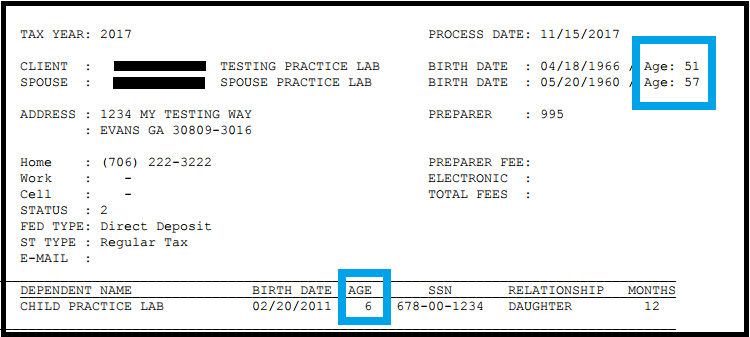
The taxpayer’s age is printing on the Client Form Listing Summary that prints with the Quality Review print set:

Blog Posted 11/15/2017  12:58 PM Eastern


Practice Lab 2017: Form 8888

15 Nov 17
Kim Manuel
,
No Comments

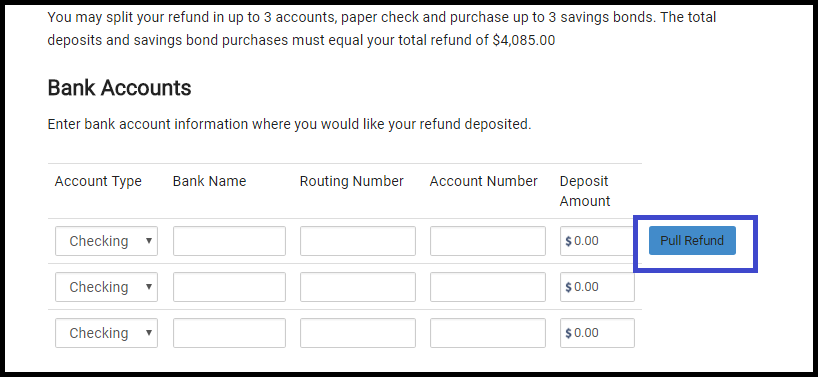
Form 8888 has been enabled in the Practice Lab site.  This will allow volunteers to complete the Basic Scenario 7 for Gordan Ferris which requires the refund to be split between a checking and savings account.

What does this mean?

When your return has a refund and you select a Direct Deposit option, you will be presented with the Form 8888 information.

What do I do for the other test scenarios where the refund is not being split?

Enter the RTN and Account number on Line 1 and select Pull Refund


Blog Posted 11/15/2017 10:07 Eastern

Practice Lab: Newly Created User Accounts

25 Oct 17
Kim Manuel

No Comments

Newly created user accounts are experiencing occasional issues logging in.  If you are taken back to the main landing page where you have to enter TRAINPROWEB rather than the login page where your new username is displayed, please take the following action:

  • Close all instances of your browser (not just the tab)
  • Open a new instance of your browser or open a different browser if available
  • Create the username again (you will most likely notice the email address is still available)

Our IT and development engineers are still researching the cause of this, but it is not impacting all new Practice Lab users.

This does not impact existing Practice Lab usernames.

This does not impact your Production Sites

Blog posted 10/25/2017  11:59 AM EST


FAQ: Pro Online: Due Diligence Checklist

24 Oct 17
Kim Manuel
, , , ,
No Comments

These are some of the questions we received about the due diligence checklist during our Administrator Webinar:

Q: Are the EITC questions and other questions underneath it going to stay populated when the return goes from the preparer to the reviewer and the reviewer is  going through the screens?

A:  Due Diligence will not be required for TaxSlayer Pro Online 2017.  However, the questions do remain answered for the prior years when someone goes back through them fore view purposes.

Q: If there is no longer a due diligence checklist, how can the preparer remove the EIC when the program calculates it, but the taxpayer does not qualify?

A:  The process will remain the same.  Navigate to Form 8862 via Forms Search and complete the Not Eligible for EIC section

Q: Will the due diligence check list go away for prior years or just TY 2017?

A: Just TaxSlayer Pro Online 2017

Q: Will the Due Diligence checklist go away for desktop?

A:  No, this only applies to TaxSlayer Pro Online.


Blog posted 10/24/2017