Tag: Pro Online

Pro Online 2017: Carry Forward Data 1099-R

16 Jan 18
Kim Manuel
,
No Comments

Scenario:  The data being pulled forward includes the 1099-R

Problem:  The Taxpayer street address is not being pulled with the information, just the City, State and Zip to the 1099-R that pulled forward

Workaround:  You will have to manually enter the street address

Solution:  We will correct this in a future update.

Blog Posted 01/16/2018

Pro Online: Production Update Alert – January 17th at 5:00am Eastern

16 Jan 18
Craig Smith
, ,
No Comments

We will be putting returns in maintenance mode to apply a series of updated on Wednesday, January 17th at 5:00am Eastern. This round of updates is scheduled to include the below items:

  • Long-term Care Insurance Premium – Fix for a validation that is occurring when attempting to edit/review original LTC Premium entries within the Itemized Deduction menu
  • Various text updates specific to 2017
  • Health Insurance – A fix for an error occurring when a Household member is added within the Health Insurance menu with zero (0) months of coverage
  • Health Insurance – A fix for a validation error occurring at e-file when marking a dependent as “Not a dependent” that is blocking access to the e-file menu. The program is incorrectly indicating the “Non” dependent must be included for Health Insurance
  • Mortgage Insurance Premium Deduction – Due to recently expiring the PMI deduction within the Mortgage Interest menu will be removed

Pro Online: Consent to Disclose Tax Return Information to VITA/TCE Tax Preparation Sites

16 Jan 18
Kim Manuel
,
No Comments

Why is this consent showing up in all of my returns?

This Consent has been assigned to all locations.  The consent must have a PIN and date for Taxpayer/Spouse in order to validate the E-file  page.  This is step 1 of a 2 year process to allow taxpayer information to be available if the taxpayer/spouse goes to an active VITA/TCE site the next year.

Can this be removed from my site?

No. This is part of the Global Carry forward program implemented for VITA/TCE.

Will I still have same site to same site carry forward data available if the consent is denied?

Yes.  This does not impact normal same site to same site carryforward

Explanation of process with a positive/accept consent (Scenario A)

  • Return is prepared at VITA/TCE Site A for Tax Year 2017
  • Consent is granted
  • Taxpayer goes to VITA/TCE Site B in Tax Year 2018
  • The taxpayer’s information is made available to pull forward at Site B because they accepted the consent

Explanation of process with a positive/accept consent (Scenario B)

  • Return is prepared at VITA/TCE Site A for Tax Year 2017
  • Consent is granted
  • Taxpayer returns to VITA/TCE Site A in Tax Year 2018
  • The taxpayer’s information is made available to pull forward at Site A because it is same site to same site

Explanation of process with a negative/deny consent (scenario A)

  • Return is prepared at VITA/TCE Site A for Tax Year 2017
  • Consent is denied
  • Taxpayer goes to VITA/TCE Site B in Tax Year 2018
  • The taxpayer’s information is NOT made available to pull forward at Site B because they denied the consent

Explanation of process with a negative/deny consent (scenario B)

  • Return is prepared at VITA/TCE Site A for Tax Year 2017
  • Consent is denied
  • Taxpayer goes back to VITA/TCE Site A in Tax Year 2018
  • The taxpayer’s information is  made available to pull forward at Site A because it is same site to same site

Known issues:

  • The Consent is not printing the appropriate wording if the taxpayer denies consent.  We are working towards a resolution that will be applied in a future update.

Pro Online: Prior Year Carry Forward Screens

16 Jan 18
Kim Manuel
,
No Comments

Pull Data to Current Return:

The top portion of the Pull Data to Current Return screen displays the specifics of the items that will be pulled forward.  This is a good opportunity to check through what the taxpayer has provided to see if they have forgotten something.  For example:  If you have three  W-2s listed (as I do below) and the taxpayer has only provided you with two W-2s, this is a good opportunity to ask about the third.  If they no longer have a W-2 from that employer, simply remove the checkbox.

Note:  Being prompted to Pull Data to Current return only occurs one time when you initially create the return.

Selecting to Pull Data to the return

The bottom half of the screen, displays the items that have no data to pull forward.  You have the opportunity to do three things at this point:

  1. Show All — expands the listing of data that does not carry forward (this example is from a different return than the screenshot above that did not have dependents or W-2s)
  2. No Thanks – Will start a blank return
  3. Yes, Import my Data — Will import that data for the items selected
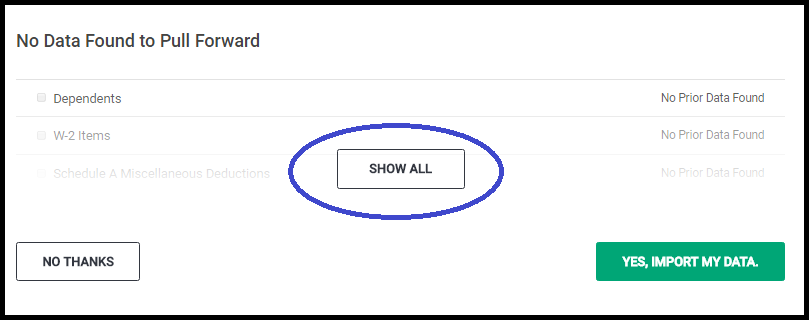
Selecting Yes, Import My Data will land you on the Filing Status Page

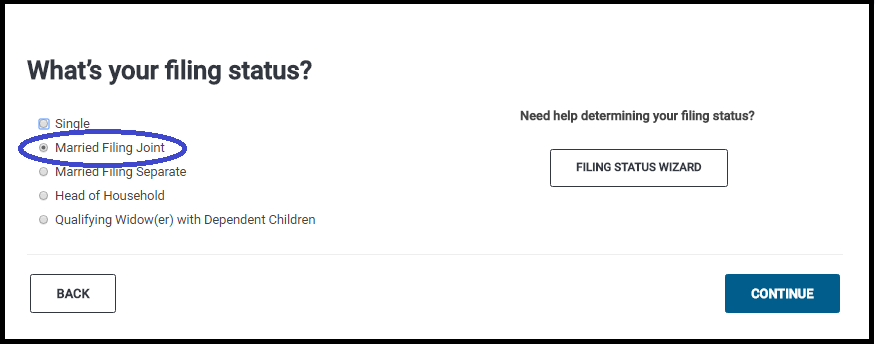
The Filing Status of the prior year return will be selected.  You have the opportunity at this point to make changes.  In the screenshot below my prior year return was MFJ.  Click Continue to review the Taxpayer/Spouse demographic information and make any corrective changes.
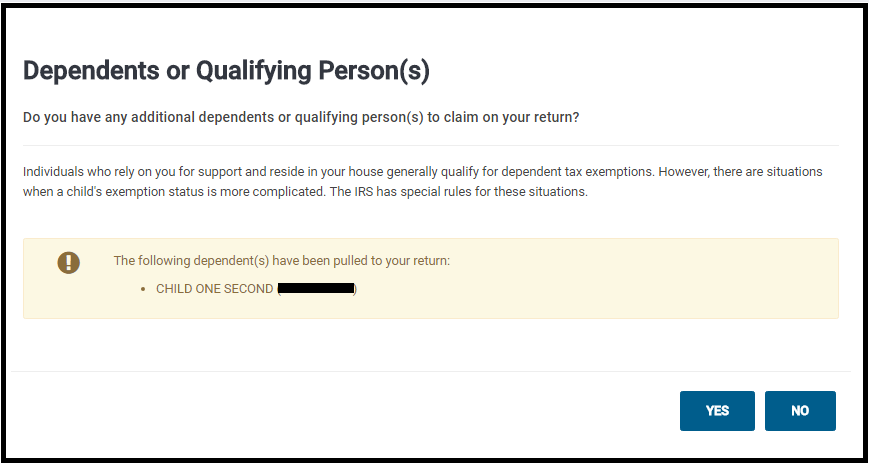
Dependents or Qualifying Person(s) screen.

This screen will display the dependents that were selected in the dependent section.  If you have additional dependents or want to make modifications select Yes, otherwise, selecting no will take you to the Federal Section.
Example of pulling forward the W-2 Information.

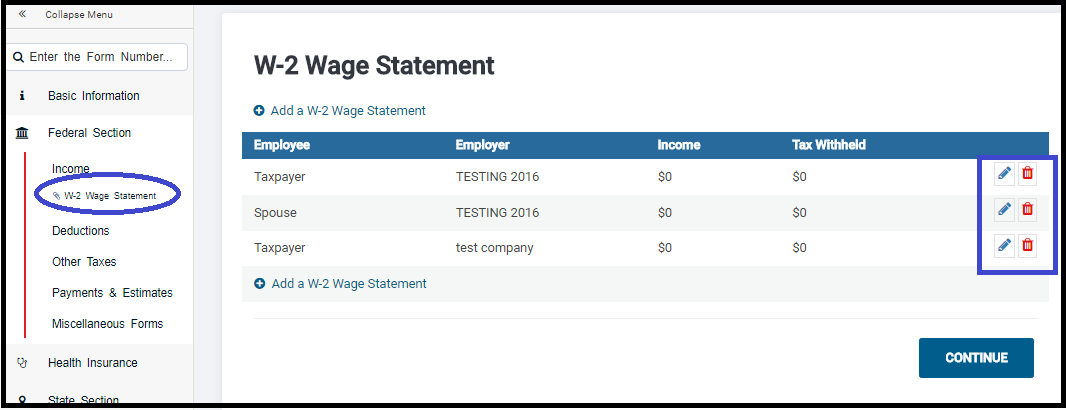
This example has three W-2s selected to pull forward.  Note:  Removing the check will prevent the information from pulling forward.

This is what your screen will look like after pulling the data forward. At this point, you can edit the income document and enter the current year income information.  Note:  If you changed the address in the Personal Information Section,  you will also need to change it on the income document you pulled forward.  Notice it loaded the W-2 Wage Statement as part of the Forms Completed feature.  Simply click on it to manage the W-2s.
Blog Posted 01/16/2017  7:54 am eastern

Pro Online 2017: Start New Return

16 Jan 18
Kim Manuel

No Comments

Start New Return has been activated for your 2017 production sites.

What returns should I complete at my site?

We strongly recommend that you only complete production returns in your site.  The Practice Lab is a Super Site in the same production environment.  If you need to conduct training or just try out a scenario, you should continue to utilize the Practice Lab for this.

Have all forms been finalized?

No.  All software vendors are still waiting to receive final forms and instructions for several forms.  An example is Schedule A.

Can I electronically file returns?

No.  We are currently scheduled to turn on electronic filing on January 29th when the IRS MeF opens.

What happens to the returns I have created if the IRS issues form changes prior to e-file opening?

You will be required to open and review ALL returns created in your production site created prior to January 29th to review the information prior to sending the return electronically.

Blog Posted 01/16/2018  6:39 am Eastern

Product Update Alert: Monday, January 15th at 5:00 am Eastern

14 Jan 18
Kim Manuel
,
No Comments

We will be putting the returns in maintenance mode on Monday, January 15th at 5:00 am Eastern for a series of updates in preparation of turning on Start a New Return on Tuesday. Items pushed out impacting TaxSlayer Pro Online are:

  • Form 8606 Entry Screen – Updated references pertaining to the current tax season
  • W-2, Box 14 – Removed the “S” from “KPERS” for Kansas Public Employee Retirement System
  • Various updates related to software used by FSA sites with self-prep kiosks

Blog posted 01/14/2018  4:44 pm Eastern

Product Update Alert: Detailed information for January 12th Update

11 Jan 18
Kim Manuel
, ,
No Comments

We will be putting the returns in maintenance mode on Friday, January 12th at 5:00 am Eastern to perform a series of updates.  This update will include:

  • Phase II of the addition of the Affordability Worksheet
  • Removal of Tuition and fees that expired
  • Color correction on Begin/Edit buttons in the state modules
  • Correction to the Healthcare exemption screen when 0 months of healthcare is indicated
  • Correction to the display of the dependent information on the Household Members section of the Healthcare section
    • Existing Dependent/Household member entries prior to the fix may have to be deleted and re-added.
    • It will not be an issue for returns started today or after or for new dependents/household members added today and after on existing returns started prior to the fix.

Pro Online: State Programs – Negative Value Entries

11 Jan 18
Craig Smith
, ,
No Comments

We have received a few issues reported in various states where an entry field acknowleding users can enter a +/- value is not allowing a negative entry (most commonly used when subtraction retirement income, military pay, etc.). This particular issue is across all states and not specific to just a few states. With that said, we are actively investigating to provide a quick resolve but in the meantime, there is a current work around that will allow negative entries to be captured.

For example, if you are looking to subtract $10,000 in a state return, your thinking will have you enter the negative sign “-“ then the amount (-10000). This is currently validating and not being allowed. The workaround would be to enter at least the first two digits (10 in this example) then using your mouse, click to move the cursor in front of the first digit (1 in this example) then you can then enter the “-“ sign. You can also use the “HOME” key on your keyboard for the same result.

Internet Explorer Specific: The negative sign “-“ that must be entered using the above steps must be the one located on the main keyboard to the left of the Backspace button and NOT the “-“ located on the number keypad.