Tag: State

Pro Online 2017/Desktop: MNPR Acknowledgements — DO NOT RESEND (RESOLVED)

09 Feb 18
Kim Manuel
, , , , ,
No Comments

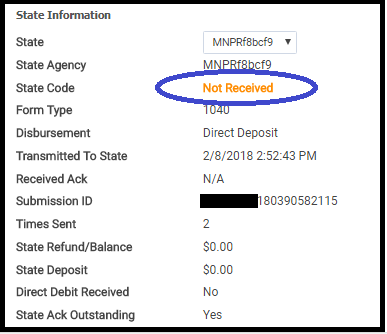
Scenario:  You have submitted your MNPR returns, but have not received an acknowledgement on it. The screenshot below indicates what it looks like from Pro Online 2017 Client Status

Problem:  We have received the acks from MN, but they are not being successfully applied.

Solution:  We are working on a solution, please do not resend your MNPR returns that you have not received an acknowledgement for.

Blog posted:  02/09/2018  8:49 am EST

Pro Online: 2015 and 2016 Arizona Reject Code 500 (RESOLVED 2/16/18)

07 Feb 18
Craig Smith
, ,
No Comments

RESOLVED 2/16/18 – Prior Year AZ returns rejected for this reason can be resubmitted at this time

If your site has transmitted a 2015 or 2016 Arizona return and it has received the below reject code, please hold on to these returns and do not resubmit until notified. We are working to resolve the issue causing this AZ state reject code. Note: This DOES NOT impact 2017 Arizona submissions.

“AZ Reject Code: 500 – The ‘stateSchemaVersion’ attribute is invalid – The value ‘AZIndividual2016v1.3’ is invalid according to its datatype ‘String’ – The Enumeration constraint failed.; Return failed Schema Level Validation.”

Pro Online/Desktop – Delay in Issuing New Mexico Acknowledgements

06 Feb 18
Craig Smith
, ,
No Comments

New Mexico has reached out to vendors to acknowledge they will be a little delayed in processing acknowledgements of individual NM returns. New Mexico indicated they are throttling the processing of incoming individual returns to ensure they are able to respond more easily to any technical issues that may arise. This means that it may take longer than usual to issue acknowledgements.

Q: What should sites do that have not received acks for transmitted NM returns?

A: Nothing. If your site has transmitted NM returns and they have not been accepted or rejected, continue to wait as NM is currently working through their backlog to issue acknowledgements. They should start coming in over the next several days.

Pro Online: New “State Only” Status

05 Feb 18
Kim Manuel
,
No Comments

The client list has a new status that you can filter returns on:   “State Only”

Can I filter my client list on the State Only status?

Yes

When will the State Only status display?

When you have electronically filed a state WITHOUT filing the federal return

Will the State Only status change when the state is accepted or rejected?

Updated 2/21:  Yes, the status will change to the final status of the state only return.  Accepted or Rejected

Blog posted 02/05/2018


Product Update Alert: Monday, February 5, 2018 5:00 am EST

04 Feb 18
Kim Manuel
, , ,
No Comments

We will be putting the returns in maintenance mode on Monday, February 5th at 5:00 am for a series of updates.  The updates is scheduled to include:

  • PA – A fix for the PA Schedule UE
  • LA – Fixed an issue where Line 5a of LA Schedule E was not populating on the print
  • Site Production Detail Report (both Electronic and Paper) were yielding zero results. This is now fixed
  • WI – Fixed an issue where the zip code entry for Private School Tuition Credit was not saving
  • RI – Fix to check the Retirement Modification qualifications when subtracting certain retirement income
  • AZ – Form 340 is now an available form to include a print set option for AZ returns
  • CA – Fixed an issue that was keeping CA Schedule X from generating in the return.

Blog posted 02/04/2018  3:42 pm EST


Alabama Reject Code: AL 40-915 series

31 Jan 18
Kim Manuel
, ,
No Comments

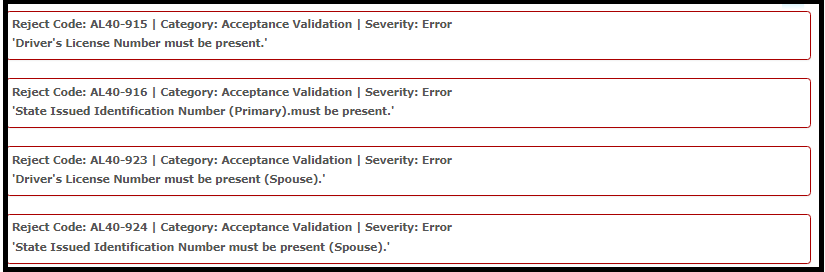
Scenario:  You selected No Drivers License or State ID from the drop down list and receive the following reject(s)

Reason:  Alabama requires a state ID for both the taxpayer and spouse.  They do not allow for no license or state ID

Solution:  If no information is available, the state will have to be filed paper


Pro Online: Send State Only (Updated 11:00 am EST)

30 Jan 18
Kim Manuel
, ,
No Comments

Updated Information

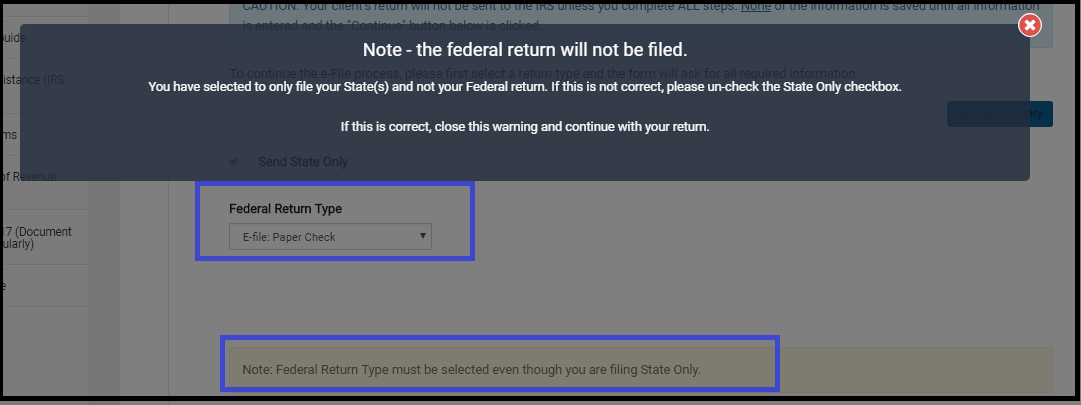
Send State Only has been activated.  Remember, you must select an e-file option for the Federal Return Type as illustrated below.  You will also have to click the note reminding you that the Federal Return will not be filed even though it is marked with an electronic Return Type.
~~~~~Original Blog Post~~~~~

We will be enabling the ability to “Send State Only” returns on Wednesday, January 31st.

What should the Federal Return type be when selecting “Send State Only”

The federal return type must be elected with an E-file option.  The federal return WILL NOT be resent, as long as you have the “Send State Only” box marked.

Where to I transmit a “State Only” return from if the IRS Return is accepted?

If the Federal Return has already been accepted, you will use the Send button located on the Submission screen in the e-file section.

My Federal is accepted and my state is rejected, what should I do?

Wait until we enable the “Send State Only” feature.  DO NOT resend the federal return in an effort to go ahead and resend the state return, this will generate an IRS reject for duplicate return.

Blog posted 01/30/2018
Pro Online/Desktop 2017: Massachusetts Acknowledgements

29 Jan 18
Kim Manuel
, , ,
No Comments

We received the following from the MA Dept of Revenue

Subject: Massachusetts Acknowledgements

Please remember that during the first few days of the tax year 2017 filing season, acknowledgements may take 24-48 hours to issue.

Blog Posted 01/29/2018  4:18 pm