Category: RESOLVED

Pro Online 2016:  Attention New Sites using Pro Online for the first year (RESOLVED)

16 Feb 18
Kim Manuel
, ,
No Comments

If your 2016 returns were rejected for IND-202, you can now resend them.

~~~~~ Original Blog Post ~~~~~

Scenario:  I am a new site using TaxSlayer Pro Online for the first year.  I electronically filed a 2016 return and received the following reject from the IRS IND-202

Why:  Your site did not automatically create a 2016 row in our system which prevented the return from going through the Vendor Control process

Solution:  We are working to get the site information into our 2016 system.  Once that occurs, you will be able to resend the rejected returns.  Issue ID 1020

blog posted 02/07/2018


Pro Online: Vermont and Minnesota Menus not Populating (RESOLVED)

16 Feb 18
Craig Smith

No Comments

Update 4:37 pm EST

This has been resolved.  Any state that was now displaying certain sub-menus are now working properly

Update 12:51 PM EST

We are testing the solution for this on our QA site.  Once we have completed testing we will be posting an update strategy that will be have the least impact on all sites.

~~~~~ Original Blog Post ~~~~

Vermont: Homestead Declaration AND Property Tax Adjustment Claim and Renter Rebate Claim – The sub-menus here are not consistently opening when clicked. We have opened Issue #1205 to review this issue. The sub-menus that may not open are:

  • HS-122
  • PR-141
  • HI-144
  • LC-142

Minnesota: M1PR, specifically the MN-CRP menu(s) may not load when clicked. We have opened Issue #1206 to review this issue.

Pro Online: Site Production Reports missing data (RESOLVED)

15 Feb 18
Kim Manuel
, ,
No Comments

Update 2/20:  Resolved

Update 2/16:  We are still working through these returns.  This primarily impacts the two Site Production Detail reports, where returns are missing from the report and another symptom is the SIDN and preparer name is blank.


~~~~~  Original Blog Post ~~~~~

The Site Production Reports are missing data from 2/8 through 2/11.  We are replaying the returns to populate the reporting database for the Management Reports

Blog Posted 02/15/2018

Pro Online: Transmitting Returns from the Transmission Menu Rendering “Error Page” (RESOLVED)

10 Feb 18
Craig Smith

No Comments

2/10/18 – 6:20om ET

The issue has been resolved and sites can now transmit returns from the Transmission menu at this time.

2/10/18 – 5:55pm ET

No additional update to report. Continue to e-file returns from the Submission page of E-file.

2/10/18 – 5:17pm ET

No additional update to report at this time.

2/10/18 – 4:49pm ET

We are still investigating at this time. Continue to e-file returns from the Submission page of E-file.

2/10/18 – 4:20pm ET

We are receiving reports of users receiving an “Error Page – An unexpected error has occurred.” From what we have been able to gather, this appears to be occurring transmitting returns from the Transmission menu from the sites Welcome screen. We are currently investigating.

We recommend transmitting returns from the Submission page at this time.

Pro Online 2017/Desktop: MNPR Acknowledgements — DO NOT RESEND (RESOLVED)

09 Feb 18
Kim Manuel
, , , , ,
No Comments

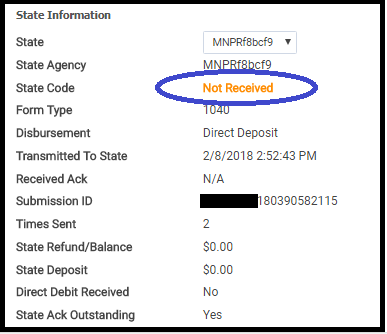
Scenario:  You have submitted your MNPR returns, but have not received an acknowledgement on it. The screenshot below indicates what it looks like from Pro Online 2017 Client Status

Problem:  We have received the acks from MN, but they are not being successfully applied.

Solution:  We are working on a solution, please do not resend your MNPR returns that you have not received an acknowledgement for.

Blog posted:  02/09/2018  8:49 am EST

Pro Online 2017: Returns from 02/08 in the Status of Transmitted (RESOLVED)

09 Feb 18
Kim Manuel
, ,
No Comments

Update 9:43 am EST

We have resolved the issue with returns not being transmitted to the IRS.  We are in the process of sending them.  They should all be out to the IRS by 11:00 am EST

~~~~  Original Blog Post ~~~~

We are currently researching why a batch of returns are still pending transmission to the IRS.  These returns will appear in the “Transmitted” status on your side.  This seems isolated to a certain point in time yesterday, as returns sent later in the evening and this morning are being transmitted to the IRS.

Blog Posted 02/09/2018  7:11 am EST

Pro Online: State Reject Codes for KS and RI (UPDATE FOR RI and KS) – RESOLVED

08 Feb 18
Craig Smith
No Comments

As of 2/7/18, we have started seeing a string of Kansas and Rhode Island returns being rejected for the below reasons. We have opened #1065 (Kansas) and #1067 (Rhode Island) with development to review these rejects. For any impacted KS and RI returns with the below reject codes, please hold on resubmitting until an update is provided on this post.

  • 2017 Kansas Returns: Reject Code 1 – The value of the ‘stateSchemaVersion’ attribute does not equal its fixed value. Line 1. Position: 172
    • UPDATE: These returns can be resubmitted. We received word from Kansas that this was an issue on their end where they did not update a version of one of their schemas related to K40PT which ultimately caused this reject code.
  • 2016 Rhode Island Returns: Reject Code X0000-002 – Incorrect Transmission data: There are no Business Rule Plugins supporting tax year ‘2016’
    • UPDATE: We have confirmed that Rhode Island is not allowing prior year returns to be electronically filed. 2014, 2015, and 2016 Rhode Island state returns must be paper filed per RI regulations.

Pro Online: Vermont Landlord Certificate: LC-142 Issue (RESOLVED)

07 Feb 18
Craig Smith

No Comments

2/10/18

The issue has been resolved where the LC-142 was not generating in the VT return when completed. For any potentially impacted VT returns, we recommend opening each return from the Client List to allow the current calculations/updates to be applied prior to submitting these VT returns.

2/7/18

An issue has been identified (assigned Issue #1055) with the 2017 Vermont Landlord Certificate, LC-142, pertaining to the Renters Rebate claimed on a VT return. The LC-142 is not generating in the PDF when completed in the VT program, potentially restricting the taxpayer(s) from receiving the renter rebate assuming other qualifications are met. The reason a taxpayer may not be receiving the renter rebate, if LC-142 is completed in the program), is due to the allocable rent from Line 9 not carrying to PR-141, Line 3. We will update this post once this issue has been resolved.