Category: Software News

Pro Online Sneak Peek: Changes to the Login Process

23 Aug 17
Kim Manuel
, ,
No Comments

We will be changing the look of the Login page, as well as some wording prior to the tax season.  We will be using the verbiage “Access Code” instead of “Security Code”

Old Look:

New Look:

Change in Unsuccessful Login Attempts Procedures:

Three (3) unsuccessful login attempts will trigger the Multi-Factor Authentication process.  Please refer to Question 2 from the blog post titled MFA:  Timing Questions (Series 1, Part 3) posted on Monday, August 21st.

Blog Posted 08/23/2017


MFA: Timing Questions (Series 1, Part 3)

21 Aug 17
Kim Manuel
,
No Comments

Q1:  Once I receive the authentication code via email or text, how long is it valid for?

A1:  It is valid until you close the browser session or request another authentication code.

Q2: A previous question (Part 2, Question 5) asked about locking the account if the authentication code was entered incorrectly.  Will there be a limitation on the times a user can attempt to login with their username, password and access code (formerly Security code) before they will prompted for MFA? (Updated 10/5)

A2:  Yes.  Once a user has attempted to login three (3) times unsuccessfully because they do not know their password they will be required to re-authenticate via MFA on the fourth attempt   The purpose is to prevent cyber criminals from making automated attempts of randomizing and finding your password.  Cyber Criminals can crack strong 16-character passwords in less an hour.


Pro Online Sneak Peek: Left Navigation Panel Views

19 Aug 17
Kim Manuel
,
No Comments

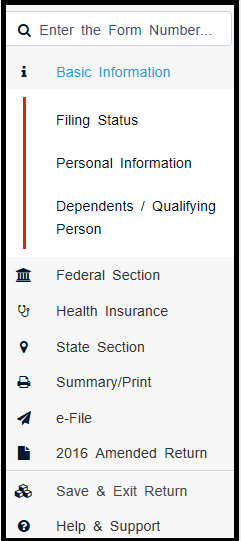
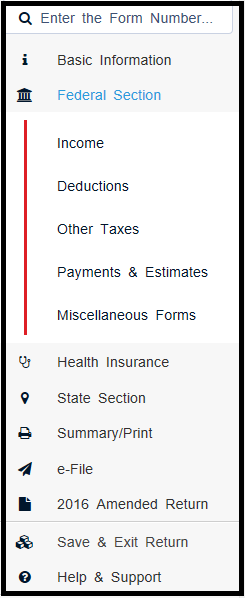
The following views will be delivered prior to tax season.  The expanded links take you directly to the section for easier navigation within the return.

Left Panel with Basic Information Expanded

Left Panel with Federal Section Expanded

Left Panel with Summary/Print Expanded

blog posted 08/19/2017

MFA: Authentication Code Questions and Answers (Series 1, Part 2)

18 Aug 17
Kim Manuel
,
No Comments

Q1:  Can one cell phone number be used for more than one volunteer? (Updated 10/5)

A1:  Multiple usernames can be attached to one cell phone number.  We understand that preparer volunteers are at multiple sites and/or have multiple usernames.

Q2:  Does the authorization code reference the user that it is for?

A2:  No, the code for both Text and email notifications indicate it is a code for TaxSlayer (No URL) and a 6 digit code.

Q3:  What is your target delivery time for the authorization code?

A3:  Text is going to be the fastest delivery method and is delivered with seconds.  Email delivery is fast as well, but it could get delayed by email services by the email provider.

 Q4:  Once a code is used, does it immediately become cancelled, or can it potentially be used more than once?

A4:  The authorization code is a one-time use code.  It becomes invalid immediately after entered and submitted.  It also becomes invalid if the user request the code to be sent again.

Q5:  Is there a number of times the user can attempt to enter the code before the application locks?

A5:  We do not lock the application based on attempts to enter the authentication code

Q6:  Is there a limit for how many requests can be made for a specific user name?

A6:  No, not at this time.


MFA: Questions and Answers (Series 1, Part 1)

17 Aug 17
Kim Manuel
,
No Comments

This is part of a series of educational posts about Multi-Factor Authentication (MFA).  As we receive questions, we will begin posting those that apply to all sites, along with answers.

Q1:  Once a user authenticates on a specific computer, how long before they will have to authenticate again on that specific computer?

A1:  The site administrator will have the ability to set the parameters from the minimum (1 day) to the maximum (still being determined by the IRS Security Working Group) for each preparer depending on the needs of the site.  When we turn the feature on, it will be defaulted to the IRS Security Working Groups recommendation.  As we receive the details, we will update the answer.

Q2: Would a TaxSlayer update wipe out the MFA Authentication?

A2:  No, we do not anticipate this happening.

Q3:  Would a computer or browser update wipe out the MFA Authentication?

A3:  We have not experienced this with our other software applications currently using MFA.  If the host site performs some type of maintenance on the computers on a nightly basis (such as wiping them and applying a fresh profile), the users will have to authenticate each day regardless of the range set by the site administrator because it will be like logging into a new device.

Multi-Factor Authentication: What is it?

16 Aug 17
Kim Manuel
,
No Comments

What is MFA (Multi-Factor Authentication)?

Utilizing something other than what you know to authenticate yourself.  An example of MFA already in use by the IRS SPEC employees is the requirement to use your badge as a factor of logging in to their computer.

Why implement MFA?

Due to the heightened awareness of personal identity theft and the growing world of cyber threats, TaxSlayer will be implementing MFA to their Professional Web-based product, TaxSlayer Pro Online.  These changes will fall in line with the IRS’s release of the Security Summit’s guidance.  With the VITA/TCE sites using borrowed computers and/or computers in locations such as libraries and community centers, MFA will add an additional layer of protection to mitigate the risk of identity theft from cyber intrusions.

What is the implementation plan?

The first time a user logs in to a unique device with TaxSlayer Pro Online 2017, they will be required to go through multi-factor authentication.  They will have the option of receiving the authentication code via email or text.

What can sites do now to start preparing?

Review the active users currently setup at your site to ensure they have unique email addresses.  The MFA system will validate the uniqueness of the email address during the authentication process.  Receiving a text message with the code is also an option and will also require a unique cell phone number.

What if the preparer volunteers at multiple sites and has multiple usernames tied to their email address?

We are in the process of designing a process that will allow for this scenario that will be in place prior to the release of TaxSlayer Pro Online 2017.

Staying in the Loop.

We will be creating educational and training posts over the next few months to keep everyone updated.  Protecting your taxpayer’s data is a top priority for TaxSlayer.

Blog Posted 08/16/2017


Pro Online: Changing “Complete” Status to “In Progress” (Live in Production)

14 Aug 17
Kim Manuel
,
No Comments

Site Administrators will have the ability to change a return with the status of Complete back to In Progress prior to tax season.  This feature can be assigned to other uses via Security Templates to more easily manage returns.

Allowing the feature in Security Templates

A new item has been added to Security Templates.  It will be defaulted to true, which will prevent any user from doing this until the Site Administrator allows access

Below is the item as default which = the user cannot change the return status

Below is the item enabled by the site administrator which = the user can change the return status from “Complete” to “In Progress”

Note:  This is also an easier method if you need to delete a return marked as “Complete”.  You will now have the ability to go from “Complete” to “In Progress” and then ” Deactivate” (all based on the Security Template applied to the user).

Changing the Complete Status

Below is an example of a return from the client list that has the status of “Complete”:

The user with the appropriate Security Template, will open the return and navigate to the Submission page in the e-file section of the return.  Below is an example of what the screen will look like:

Click Yes to change the status back to “In Progress”.  Below is an example of what the screen will look like after clicking Yes:

Save and Exit the return.  Below is an example from the client list after the status has been changed:

Note:  The return can be marked “Complete” again after this process has been used.

Blog Posted 08/14/2017



Pro Online: Changing the Order of Custom Answers (Live in Production)

26 Jul 17
Kim Manuel
, ,
No Comments

The ability to change the order of how the answers display for the custom questions created at your site or created by a multi-site/Relational login and assigned to a site will be deployed prior to the upcoming tax season.  This will allow you to manage the order you want the answers to be displayed during return creation.  Another advantage of this change will allow you to “insert” an answer where you need it mid season rather than having to delete the list and start over.

Old Custom Question and Answer page:

Coming Soon:  Custom Question and Answer page.

Simply drag the answers to the positions you want them to appear during return preparation

Blog Posted 07/26/2017