Tag: Pro Desktop

Pro Online/Desktop 2017: Massachusetts Acknowledgements

29 Jan 18
Kim Manuel
, , ,
No Comments

We received the following from the MA Dept of Revenue

Subject: Massachusetts Acknowledgements

Please remember that during the first few days of the tax year 2017 filing season, acknowledgements may take 24-48 hours to issue.

Blog Posted 01/29/2018  4:18 pm

2017 TaxSlayer Pro Desktop: Office Identifier

19 Dec 17
Craig Smith
, ,
No Comments

Purpose:  The Office Identifier is a number generated by TaxSlayer.  This is a Vendor Control Number required for electronic filing.  The field must be present in the-e-file for acceptance.  The goal is for the IRS to validate the number in the e-file with the number uploaded by the software vendor.

Question:  Where is this located?

Answer:  The field will be displayed on your Office/Firm Setup screen where you enter your Firm Information.

Question:  How do I find the office identifier

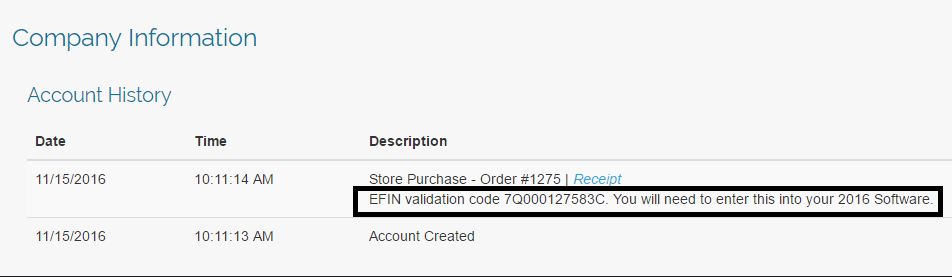
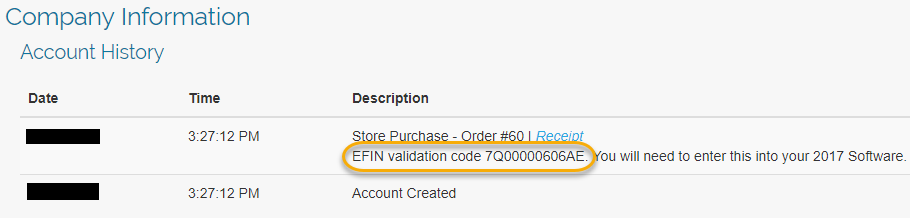
Answer:  Login to My Account from the VITA/TCE Springboard with the username and password you established via the User Information email link once received after your order is processed.  Once you are logged in, select Account History on the left navigation bar.
 

Question:  Is this  number unique to my site?

Answer:  Yes, it is unique to the EFIN.

Question:  Will this number ever change?

Answer: The number will change if the EFIN associated with your site changes
FAQ: Pro Online: Due Diligence Checklist

24 Oct 17
Kim Manuel
, , , ,
No Comments

These are some of the questions we received about the due diligence checklist during our Administrator Webinar:

Q: Are the EITC questions and other questions underneath it going to stay populated when the return goes from the preparer to the reviewer and the reviewer is  going through the screens?

A:  Due Diligence will not be required for TaxSlayer Pro Online 2017.  However, the questions do remain answered for the prior years when someone goes back through them fore view purposes.

Q: If there is no longer a due diligence checklist, how can the preparer remove the EIC when the program calculates it, but the taxpayer does not qualify?

A:  The process will remain the same.  Navigate to Form 8862 via Forms Search and complete the Not Eligible for EIC section

Q: Will the due diligence check list go away for prior years or just TY 2017?

A: Just TaxSlayer Pro Online 2017

Q: Will the Due Diligence checklist go away for desktop?

A:  No, this only applies to TaxSlayer Pro Online.


Blog posted 10/24/2017


VITA/TCE Springboard: Everything is now at your fingertips

25 Aug 17
Kim Manuel
, ,
No Comments

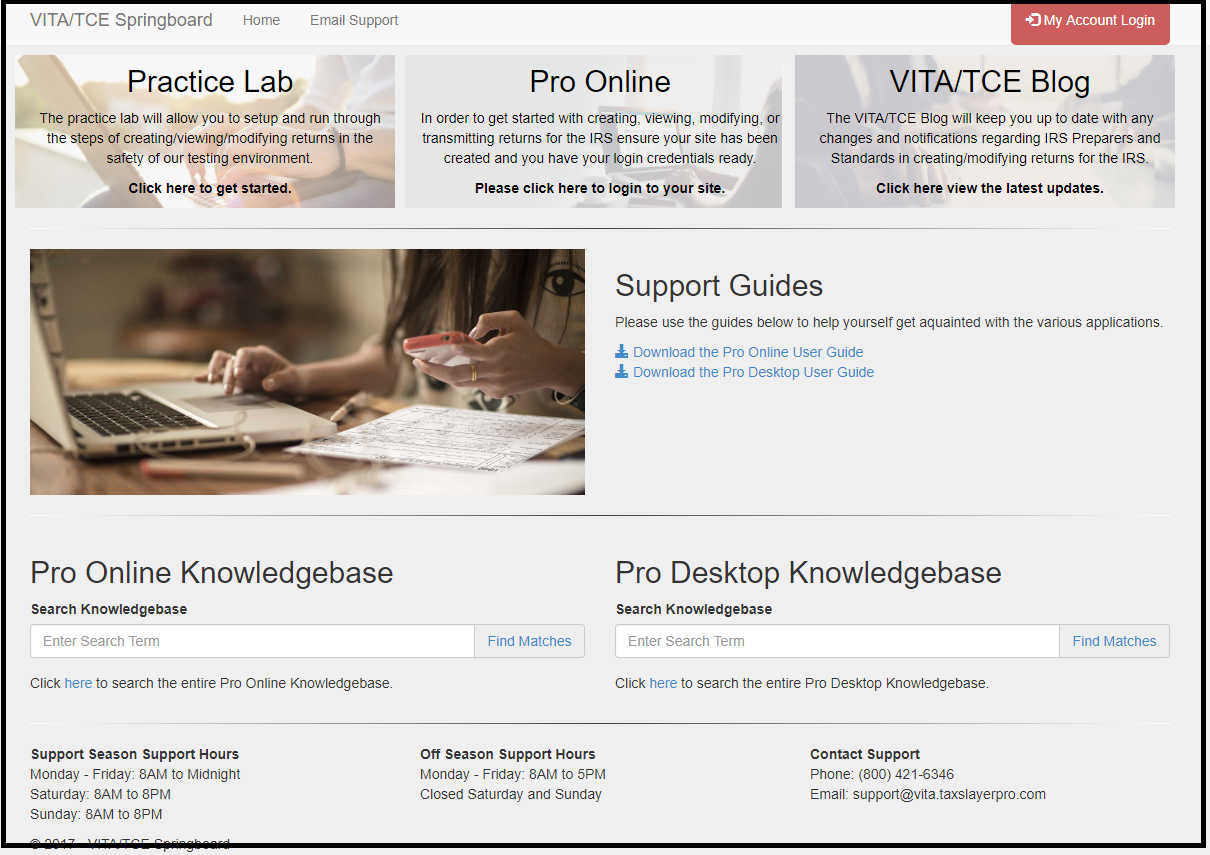
This fresh new looks allows you to access more information without having to scroll.

Imperfect Return Indicator — What is it?

27 Jan 17
Kim Manuel
, ,
No Comments

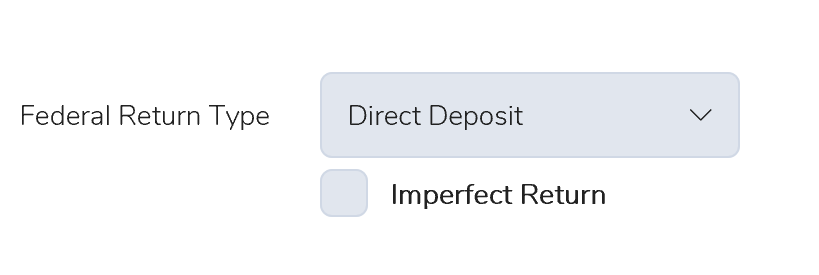
If your federal return is rejected for a SSN/Name Control business rule, you will see the Imperfect Return option appear under the Federal Return type on your e-file page.

0127 Imperfect Return

We give the preparer the choice of working with the taxpayer to make this correction or allowing the IRS to make the the correction.  If selected, an “Exception” status indicates to the IRS that the return was previously rejected for the business rule.  The IRS will continue to process the return and a notice will be sent to the taxpayer advising them of any change made as a result of the Imperfect Return indicator.  This prompts the IRS system to match the information from previously accepted returns.  The returns with the Imperfect Return indicator are typically processed in 4-6 weeks after acceptance.

Disadvantages of Using the Imperfect Indicator;  The IRS matches the information on the back end the site is unaware of the match changes to make corrections on the return.  This will result in the same data being carried forward next year and the return being rejected for the same business rule.


Blog Posted 01/27/2017  7:50 AM EST


Desktop: Office Identifier

01 Dec 16
Kim Manuel
, ,
No Comments

Purpose:  The Office Identifier is a number generated by TaxSlayer.  This is a Vendor Control Number required for electronic filing.  The field must be present in the-e-file for acceptance.  The goal is for the IRS to validate the number in the e-file with the number uploaded by the software vendor.

Question:  Where is this located?

Answer:  The field will be displayed on your Office/Firm Setup screen where you enter your Firm Information.

Question:  How do I find the office identifier

Answer:  Login to My Account from the VITA/TCE Springboard with the username and password you established via the User Information email link.  (Links will be sent by COB 12/02/2016) Once you are logged in, select Account History on the left navigation bar.

my-account-account-history

Question:  Is this  number unique to my site?

Answer:  Yes, it is unique to the EFIN.

Question:  Will this number ever change?

Answer: The number will change if the EFIN associated with your site changes
 

Best Practice: Adding more than 4 entries for W-2 Box 12

24 Oct 16
Kim Manuel
, ,
No Comments

Generally a W-2 only has need for 4 entries in Box 12.  Occasionally you will need more.  When faced with this situation, you can follow this simple solution:

  • Add the first four entries to the original W-2
  • Add a second W-2 with the same employer ID (the program will ask you if you are sure you want to do this as  precaution)
  • Subtract $1 from Gross Wages in the original W-2
  • Put in $1 for Gross Wages in the 2nd W-2
  • Enter the additional entries for Box 12

The program will add the W-2 information together when it is sent to the IRS in the electronic file.

How do I access Prior Year Returns in Pro Desktop?

05 Oct 16
Kim Manuel

No Comments

TaxSlayer will deliver the current year and three prior year installs for all sites placing an order for the TaxSlayer Pro Desktop software.

Each year will be installed and will be accessed by clicking on a  year specific icon.