Tag: Pro Online

Pro Online: Production Update Alert – 12/19 at 6:00am Eastern (UPDATED)

18 Dec 17
Craig Smith
, ,
No Comments


A production update is scheduled for deployment on Tuesday, December 19th at 6:00am Eastern. A couple items included in tomorrow’s update listed below will be pushed live.

  • Minnesota – Adding M1PR to a MN return has been relocated to the “Localities” menu accessible from the main state return grid. The wording “Localities” will be updated to reflect “Property Tax Refund”

  • Schedule K-1 – A fix will be released to properly save Schedule K-1 entries and carry the data to the 1040.
    • An issue existed where if you entered income, saved that entry, then exited the Schedule K-1 menu without continuing through (i.e. exited using the left navigation menu) the remaining sub-menus, the data entered as income was not carrying to the 1040.
  • State Returns– The issue requiring two-clicks within certain state sub-menus to navigate forward or back has been resolved.
Pro Online: F8888 now offers RTN/ACCT Verfication

15 Dec 17
Craig Smith
, , , ,
No Comments

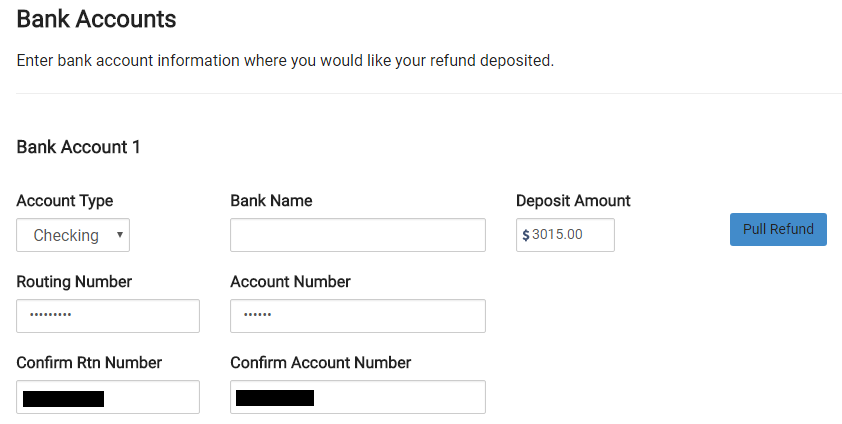
A new feature was released for sites that will be offering the 8888. Now, when entering direct deposit information inside the E-file menu, if your site is set up to offer the 8888, you will be required to verify both the RTN and ACCT numbers provided. This will work just as the current Direct Deposit entry functions for sites that do not offer the 8888 at their sites. After entering the initial RTN/ACCT number information, it will be masked requiring the preparer to verify the confirmation entry by referring to the documents in hand. Adding this new feature for the 8888 will go a long way in ensuring the correct direct deposit information is entered the first time by the preparer before moving to quality review.


2017 Orders: Pro Online – Renewal with No Site Admin Change

15 Dec 17
Craig Smith

No Comments

As we continue to receive and process orders from the IRS, we wanted to post a reminder of how setting up your site works if you are simply renewing for the upcoming tax season and the Site Administrator has NOT changed.

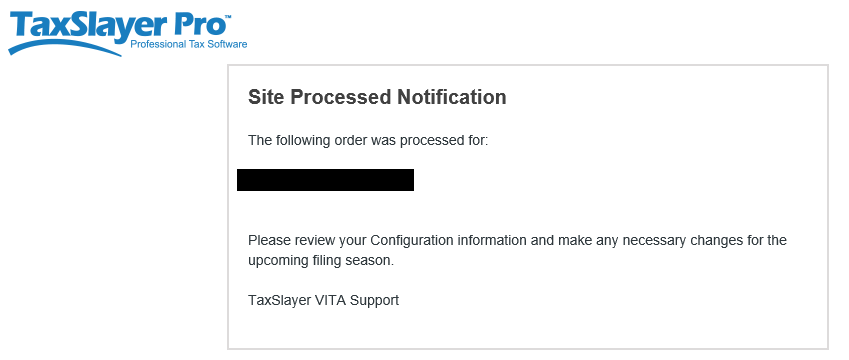
When we receive an order for a site that existed this past tax season and the Site Administrator has NOT changed, the existing Site Administrator (listed on the order) will receive one (1) e-mail from TaxSlayer Pro. The Site Administrator will receive the “Site Processed Notification” e-mail with the message body shown below. Notice a link to activate your site is NOT included. This is because your site was previously activated around this time last year (2016) and is still active. Since you are the existing Site Administrator, use your existing login credentials for the site listed in your e-mail to verify the entries in the “Configuration” menu are accurate and make adjustments if needed.


Pro Online: Multi-site and Relational Admin accounts

17 Nov 17
Kim Manuel

No Comments

We are temporarily making all Multi-Site and Relational Admin Accounts inactive until the Tax Year 2017 orders are processed.  As we begin processing the orders and updating the groups based on this year’s orders, we will do one of the following:

  1.  Create new Admin Account logins if the group admin has changed
  2.  Reactivate the Group Admin Account

Either way, an email notification will be sent once the multi-site and/or Relational Admin accounts are activated for Tax Year 2017.

Blog Posted 11/17/2017  8:02 am Eastern

Pro Online: Forgot Username Link

16 Nov 17
Kim Manuel
,
No Comments

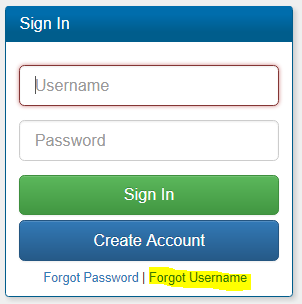
The Forgot Username link associated with the Pro Online login only emails usernames that have completed the Account Update page or were created after the roll out of MFA in early September.

Scenario:  I am returning volunteer and do not remember the username that I used last year to prepare returns.  How do I retrieve it?

You will need to contact your site administrator.  They can ensure that your username is still active at the site, update your user account with any changed information and provide you with the username(s) they have established for you at the site.

Can TaxSlayer support update my information and give me my username?

No.  The support team does not have a listing of the users that will be volunteering at the site for the upcoming season.

If I do not know my username, how can I complete the returns for my certification test?

You will login with your Practice Lab username and password to complete your certification test.  Start New Returns for 2017 is not turned on at any other site to prevent practice returns from being intermingled with production returns.  If you have forgotten your Practice Lab username, select Practice Lab from the VITA/TCE Springboard and select the Practice Lab block.  Enter the generic Password (same as last year).  Select the forgot username link, enter the email address that you entered when you created your Practice Lab account and click Submit

Blog posted 11/16/2017


Practice Lab 2017/Pro Online: View/Print a single Form (live in Production)

16 Nov 17
Kim Manuel
,
No Comments

The following feature is now live in production.

Scenario:  When I click the Printer icon on the menu, it gives me a page that looks like a print of the menu.  How do I fix this?

Solution:  Clear your cache or press Ctrl+F5 to reload.


Scenario:  I printed a single form (Schedule C as an example) and then went to immediately print the entire tax return and it is only generating a Schedule C.

Solution:  You can make a change in the return on any screen to render the entire PDF or close the return and print from the client list.  We are going to make a change to the configuration to eliminate this in the morning.


Feature:  Give the volunteer the ability to view the information on specific forms without having to render the PDF for the entire tax return

Example: The preparer completes a Schedule C for the taxpayer and wants to quickly view the information entered for it.  When the preparer clicks continue from the Schedule C summary page and returns to the Income Menu, a print icon will be available.

This will render a PDF of the Schedule C(s) in the return for review or for print.

Forms that will be available to view/print for TaxSlayer 2017:

  • Schedule A
  • Schedule B
  • Schedule C
  • Schedule D
  • Schedule R
  • W-7
  • Form 1116
  • Form 2441
  • Form 5329
  • Form 5405
  • Form 8606
  • Form 8863
  • Form 8880
  • Form 8962 in the Health Care Section (Still in Progress)
  • Form 8965 in the Health Care Section (Still in Progress)

Blog Posted 11/10/2017

Practice Lab 2017/Pro Online 2017: Due Diligence is no longer required

16 Nov 17
Kim Manuel
,
No Comments

The Due Diligence pages are no longer in TaxSlayer Pro Online 2017.  This is now live in production.

The Non Resident Alien question has been moved to the Basic Information section.  Prior to the beginning of e-file, it will disqualify the return from calculating EITC when selected for the appropriate circumstances.

Note:  This change is not applicable to prior year software.

Blog Posted 11/16/2017  11:50am Eastern

Practice Lab 2017: Direct Debit Information

15 Nov 17
Kim Manuel
, ,
No Comments

Scenario:  The tax return has a balance due and a federal return option for Direct Debit is used.

The direct debit information prints on the Client Form Listing Summary in the Quality Review print set.  You can create a custom print set at your sites and include this form.  If the return falls into this scenario, you can select the custom print set that will print the information with the return.

An alternative solution would be to generate the Quality Review PDF and print the page that displays this information and give it to the client.

Blog Posted  11/15/2017  1:02 PM Eastern