Category: RESOLVED

Pro Online: 1099-R PSO Exclusion Subtracting from Gross Distribution when Box 1 and 2a are Different (RESOLVED)

20 Mar 18
Craig Smith

No Comments

3/22/18 – RESOLVED – We recommend accessing each impacted return to verify the 1099-R and PSO exclusions are correctly reflected prior to filing.

Issue #1703 has been opened to resolve an issue that started on Monday, March 19th, after updates were deployed (after 6:00am ET).

What is the issue?

  • Claiming the PSO Exclusion within the 1099-R, shows the exclusion amount being subtracted from the Box 2a (taxable amount) entry. However, what is carrying to the 1040 and included in the calculation of the return is the PSO excluded amount subtracted from the Gross Distribution (Box 1).

What returns may be impacted?

  • Returns reporting a 1099-R with a PSO Exclusion where the amount in Box 2a (taxable amount) is different than the amount in Box 1 (Gross Distribution). Do not file impacted returns until this post has been marked as RESOLVED.

What returns are not impacted?

  • Returns reporting a 1099-R with a PSO Exclusion where Box 2a (taxable amount) is the same as the amount in Box 1 (Gross Distribution) before the exclusion is applied.
  • Returns reporting a 1099-R and the Simplified General Rule Worksheet is used to determine the taxable amount and also taking the PSO Exclusion from the SGRW calculated taxable figure.

Pro Online: Sporadic Reports of State Sub-menus Loading Blank (RESOLVED)

19 Mar 18
Craig Smith
No Comments

3/19/2018 – 12:29pm ET

The sporadic issues of state sub-menus opening blank should now be resolved

3/19/2018 – 11:15am ET

Development has found the error and is currently building the fix.

3/19/2018 – 9:39am ET

We have received sporadic reports from the field of specific state sub-menus loading a blank page. We are currently looking into these reports. We will keep a running list of confirmed state sub-menus not loading as we can replicate. This is not a widespread.

If you are in a state return and a sub-menu is loading blank for you, we recommend logging out of the program and back in to create a new session (you can use the back button on your browser if a sub-menu loads to blank). Clearing your cache may also fix this issue as well.

  • North Carolina – Subtraction from Income sub-menu
  • Ohio – Credits > Nonbusiness Credits sub-menu
  • New Jersey – Income Subject to Tax sub-menu
  • Nonresident California – Income Subject to Tax > Other Income Taxable to California
  • New York – Subtractions from Income > Other Subtractions
  • Arizona – Subtractions from Income sub-menu
  • Maryland – Basic Information > Change Filing Status from MFJ to MFS for State Purposes Only sub-menu
  • Illinois – Subtraction from Income sub-menu

Desktop 2017: Errors after updating (RESOLVED)

19 Mar 18
Kim Manuel
,
No Comments

Updated 8:52 am:  

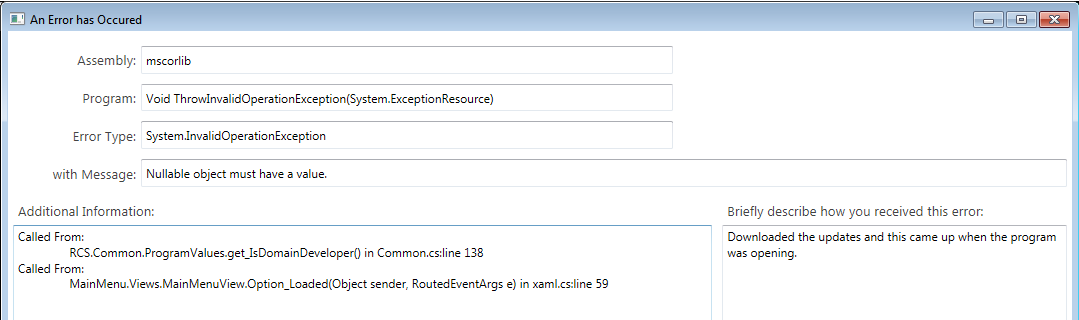
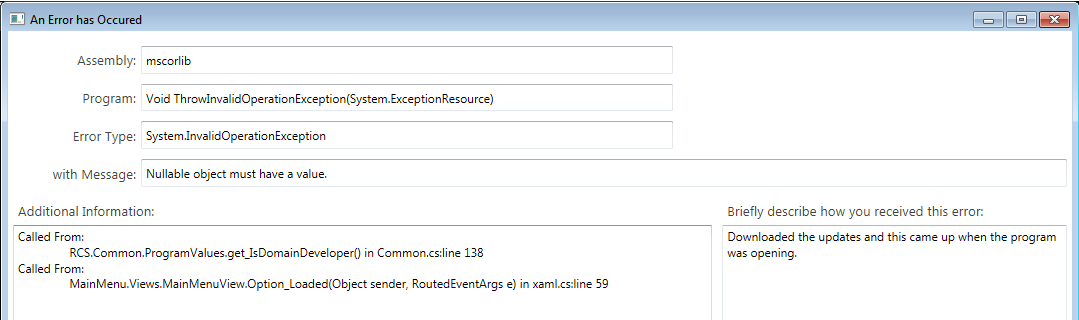
When the error appears, click OK and then go in to Updates.  Download the latest update and the error will be resolved.

Updated 8:47 am:  The updating causing the error has been rolled back.  Anyone opening the program from this point forward should not receive the below errors.  We are in the process of building a fix for the user receiving the below error.

Scenario:  Desktop users are receiving the following errors after this morning’s update:

Solution:  This will be resolved within the next hour.

Note:  This does not impact Pro Online

Pro Online: Update on VT Issue #1589 for PR-141 (RESOLVED)

16 Mar 18
Craig Smith
No Comments

3/19/18 – Issue #1589 is now resolved

The fix for the VT Renter Rebate amount on Line 9 of PR-141 being limited to $3,200 instead of $3,000 is scheduled to go out Monday, March 19th. Continue to utilize Return Tags at your sites to track any VT returns showing amounts above $3,000 on Line 9 of PR-141. Impacted VT returns can be transmitted once this blog post has been marked resolved.

Pro Online: 1099-R Box 2a Not Displaying Gross Distribution Amount (RESOLVED)

15 Mar 18
Craig Smith

No Comments

3/21/2018 – RESOLVED

We have opened Issue #1646 to correct a display issue when first creating a 1099-R in a return. The Gross Distribution reported in Box 1 is not displaying in Box 2a. If creating a new 1099-R and reporting the Gross Distribution, you don’t catch that Box 2a didn’t auto-fill, don’t worry, the value is still saved when clicking “Continue” to exit the 1099-R. There is no impact to a return in this situation.

  • When creating a new 1099-R, entering $10,000 in Box 1, saving the entry without also entering a value in Box 2a, the 1099-R will save the taxable amount as if it automatically carried over from Box 1 (which it still does)
  • When creating a new 1099-R, entering $10,000 in Box 1, then making a manual entry in Box 2a of $9,000, the manually entered Box 2a amount of $9,000 is what saves and carries to the return as taxable
  • When creating a new 1099-R, entering $10,000 in Box 1, then completing either the Simplified General Rule Worksheet and/or PSO exclusion, the correct taxable amount will carry to Box 2a and be included with the return

This is only a display issue when tabbing off of the 1099-R Box 1 field and not seeing the same value auto-fill within Box 2a.

Pro Online: RRB-1099-R, Manual Box 7a Entry not Carrying to 1040 as Taxable (RESOLVED)

15 Mar 18
Craig Smith

No Comments

3/19/18 – This is now resolved. For any existing RRB-1099-R entries that may have been impacted, you will need to edit each entry to re-enter the Box 7a amount to save.

We opened Issue #1640 for taxable amounts entered within the RRB-1099-R not carrying to Line 16b as taxable on the 1040. This is only occurring if Box 7a is manually entered by the user. If entering a RRB-1099-R and determining the taxable amount either by using the Simplified General Rule Worksheet or applying a PSO exclusion, the calculated taxable figure is carrying to 1040 as expected.

If needing to manually enter the taxable amount in Box 7a for a RRB-1099-R, we recommend holding those returns until this post is marked as resolved. We also recommend utilizing Return Tags to track any impacted returns your site(s) may have.

Pro Online 2017: Ohio Locality RITA 37 Form (RESOLVED)

10 Mar 18
Kim Manuel
, ,
No Comments

Update 3/13 — Resolved with morning update

Scenario:  I have added the Ohio Locality RITA 37 form to my state return.  The return will no longer render calculations and/or prints.

Alternative solution:  You will need to delete the State return and add it back.  DO NOT add this form back at this time.  You can create a custom return tag and tag the return.

Solution:  We will resolve this in a future update

Pro Online: CA “Other Additions” and “Other Subtractions” (RESOLVED)

09 Mar 18
Craig Smith

No Comments

03/11 — Resolved with Monday updates

Issue #1536 for the California sub-menus of “Other Additions” and “Other Subtractions” opening a blank page has been reported. The fix should be deployed early next week. If your site is preparing CA returns needing either of the below menus, we recommend creating a Return Tag to track these CA returns to update once Issue #1536 is resolved.

California > Additions to Income > Other Additions


California > Subtractions from Income > Other Subtractions