Tag: Pro Online

Product Update Alert: Monday, February 5, 2018 5:00 am EST

04 Feb 18
Kim Manuel
, , ,
No Comments

We will be putting the returns in maintenance mode on Monday, February 5th at 5:00 am for a series of updates.  The updates is scheduled to include:

  • PA – A fix for the PA Schedule UE
  • LA – Fixed an issue where Line 5a of LA Schedule E was not populating on the print
  • Site Production Detail Report (both Electronic and Paper) were yielding zero results. This is now fixed
  • WI – Fixed an issue where the zip code entry for Private School Tuition Credit was not saving
  • RI – Fix to check the Retirement Modification qualifications when subtracting certain retirement income
  • AZ – Form 340 is now an available form to include a print set option for AZ returns
  • CA – Fixed an issue that was keeping CA Schedule X from generating in the return.

Blog posted 02/04/2018  3:42 pm EST


Quality Alert from SPEC Headquarters: 2018 Form 1040-ES

02 Feb 18
Kim Manuel
,
No Comments

Background: The IRS is continuing to update its programming and processing systems for some 2018 forms impacted by the Tax Reform Act.  This includes Form 1040-ES, Estimated Tax for Individuals, for all software vendors.  IRS expects to release this form to software vendor in mid-February.

Once the form is released TaxSlayer will update the software with the correct 2018 Form 1040-ES.  Until this form is released by IRS, VITA/TCE sites should not provide the 2017 coupons currently printing from the software to the taxpayer.

Message to the Taxpayer: Inform taxpayers that the 2018 1040-ES is not currently available from IRS due to the recent tax law changes and to check IRS.gov in late February to obtain the 2018 copy. Estimated payments are due quarterly so the first payment for the year is not due until April 15. So, there is time to determine the amount of your estimated payments.

Estimated payments are due on the 15th of April, June, September and January of the following year. Note: If these due dates fall on a Saturday, Sunday or legal holiday, the payments are due the next business day. Once available you may send estimated tax payments with the 2018 Form 1040-ES, pay online at https://www.irs.gov/payments, or from a mobile device using the IRS2Go app.

Thank you for your patience and continued support as we work through this process together.

Pro Online: Change to Returns in Transmitted Status

02 Feb 18
Kim Manuel
, , ,
No Comments

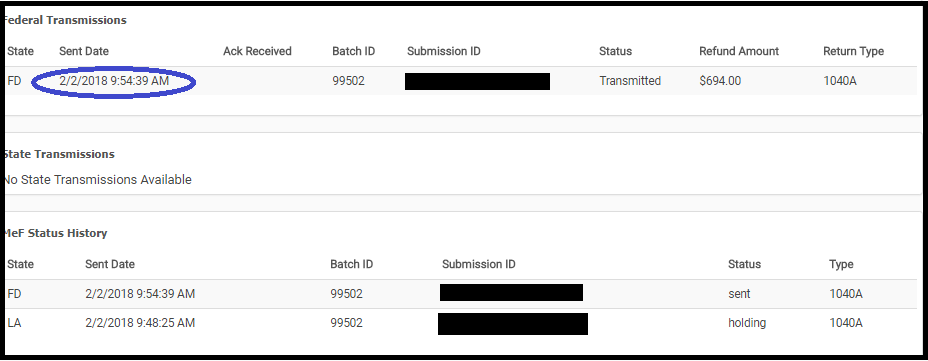
We made a change to what the preparer can do with a return while it is in the status of “Transmitted”.  We removed the ability to open a return and make changes to it while it is in the status of “Transmitted”


The average turn around time for federal acknowledgements is 7 to 15 minutes.

How do I correct federal returns with validation errors because they stay in the transmitted status

Navigate to Rejected Clients on the Welcome Screen and select Validation errors.  A list of returns with outstanding federal validation errors will be listed.  Click Select to open the return

What if the return does not show up under validation errors?

We have not received an acknowledgement from the IRS.  You can still view the Client Status to see where the return is in the transmission process

What if the return is a true State Only return and there was no federal filing requirement?

We will be making a modification to the status to indicate that it is a “State Only” return (where there was no federal return filed) to allow you to open it to make corrections to state rejects.

What about my 2015 returns that have a true validation error?

We will be adding an option to allow you entry into these returns from Rejected Clients.


IRS Reject: R0000-504-2

01 Feb 18
Kim Manuel
,
No Comments

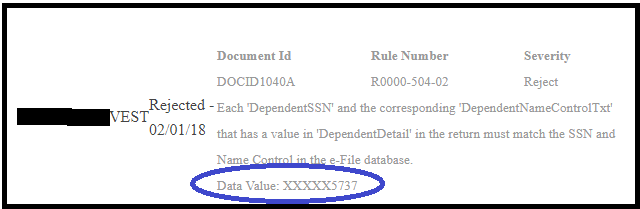
Scenario:  My return was rejected because the Dependent SSN does not match the Name Control on file with the IRS.

How do I know which dependent?  The IRS ack and the client status will display the last 4 digits of the SSN

Tip:  Verify that the information entered matches the information on the Social Security card to ensure there are no typographical errors,


Pro Online 2016/2015: Consent to Disclose Tax Return Information to VITA/TCE Tax Preparation Sites

01 Feb 18
Kim Manuel
,
No Comments

Scenario:  The Consent to Disclose Tax Return Information to VITA/TCE Tax Preparation Sites is showing up in my 2016 and 2015 return.

Why? The consents are currently designed to be year agnostic.  We are looking to modify this behavior in the future.

What do I do? Since the consent does not apply to the tax years 2016 and 2015, you can simply select deny, enter a PIN and date.

Blog Posted 02/01/2018

Illinois Reject Code: ILHEADER-2400-5 (RESOLVED:ACTION REQUIRED)

01 Feb 18
Kim Manuel
, ,
No Comments

Update 2/1  3:35 pm EST

Illinois has modified their business rule to accommodate the filing of returns without an EIN.  You can now resend the returns by doing the following:

(1) Select the return

(2) Navigate to the e-file page

(3) Select the Send State Only option  IMPORTANT:  The federal return type must be an e-file type

(5) Click through the warning message that the federal return will not be sent

(6) Select Save to navigate to the Transmission page

(7) Select Save and Transmit Return

Note:  If the federal return has been accepted, you must Save and Transmit the return from the Submission page.

Update 1/31 3:48 pm EST

This is a new business rule for the state this year.  We have reached out to state for further clarification

~~~~ original blog post~~~~

Scenario:  My Illinois return is rejected for the following:

REJECTPAID PREPARER FIRM FEIN (PREPARERFIRMEIN OR MISSINGEINREASONCD) MUST BE PRESENT WHEN PREPARERPERSONNM IS PRESENT AND SELFEMPLOYEDIND CHECKBOX IS BLANK

What to do:  Hold these returns for now

Solution:  We have this under review Issue ID 893

Pro Online 2017: MN Validation Error (RESOLVED: ACTION REQUIRED)

01 Feb 18
Kim Manuel
,
No Comments

Resolved

The validation error has been resolved.  However, you will need to wait until we have enabled “Send State Only” to resend the returns that received this validation error if the Federal return has already been accepted.

How do I know which returns had the validation error?

They are listed on Reports>Validation Errors


~~~~~Original Blog Post~~~~~

Scenario:  You receive the following state validation error for MN:

This has been reported to our state development team Issue ID 872

Blog posted 01/29/2018

Pro Online: Send State Only has been Disabled (RESOLVED)

31 Jan 18
Kim Manuel
,
No Comments

Update 02/01

The Send State Only feature has been enabled

~~~~~ ORIGINAL BLOG POST~~~~~

We have temporarily turned off the Send State Only function.  If you have accepted federal returns and rejected states, please hold these until we enable this function again.

We have received some abnormal e-files and are researching the root cause.

Blog posted 01/31/2018