Tag: Pro Online

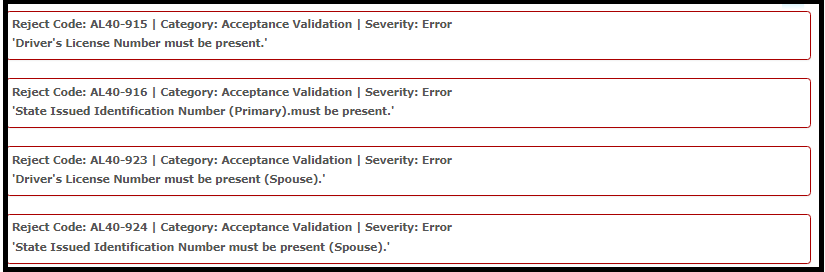
Alabama Reject Code: AL 40-915 series

31 Jan 18
Kim Manuel
, ,
No Comments

Scenario:  You selected No Drivers License or State ID from the drop down list and receive the following reject(s)

Reason:  Alabama requires a state ID for both the taxpayer and spouse.  They do not allow for no license or state ID

Solution:  If no information is available, the state will have to be filed paper


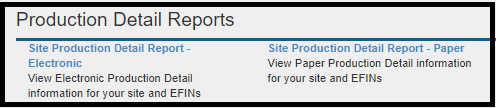
Pro Online: Site Production Detail Reports (Electronic and Paper) (RESOLVED)

31 Jan 18
Kim Manuel
, ,
No Comments

Scenario:  You run either one of these reports

Results:  Nothing (blank screen)

Solution:  This will be corrected in a future update


Blog posted 01/31/2018


Pro Online: Activating Users at Active Sites

31 Jan 18
Kim Manuel

No Comments

Scenario:

Craig is a user at Kim’s Sample VITA/TCE Site.  His username is marked as Inactive, so he is getting the message that his username is inactive when he tries to login.

What should Craig do?

Craig should contact his site administrator.  I may have made Craig inactive for a very specific reason.  TaxSlayer support WILL NOT activate a user at a site that is not the Site Administrator.

Blog posted 01/31/2018


Pro Online 2017: Where does Direct Debit Information Print

31 Jan 18
Kim Manuel
,
No Comments

Scenario:  The tax return has a balance due and a federal return option for Direct Debit is used.

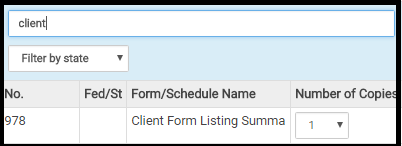
The direct debit information prints on the Client Form Listing Summary in the Quality Review print set.  You can create a custom print set at your sites and include this form.  If the return falls into this scenario, you can select the custom print set that will print the information with the return.

An alternative solution would be to generate the Quality Review PDF and print the page that displays this information and give it to the client.

Below is an example of the form you would choose to include in a custom print set

blog posted 01/31/2018

Pro Online 2017: Entering Direct Deposit Information

30 Jan 18
Kim Manuel

No Comments

Where do I enter Direct Deposit Information?

You will enter direct deposit information in the e-file section of the return.

If the return has a refund, you will select a Direct Deposit option from the Federal Return Type drop down list.

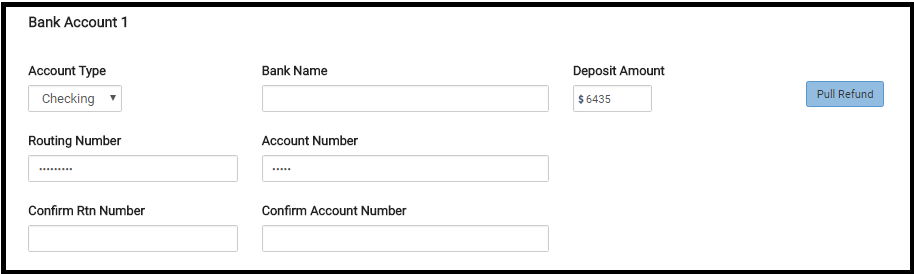
You will then be prompted to enter and verify the RTN and DAN.

The below screenshot is from a return where “Offer 8888” is selected.  The screen will vary based on this selection


Pro Online: Send State Only (Updated 11:00 am EST)

30 Jan 18
Kim Manuel
, ,
No Comments

Updated Information

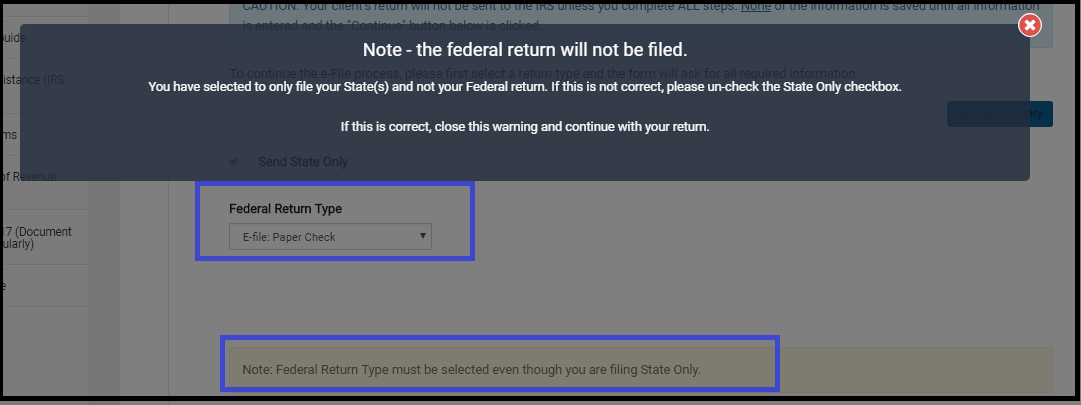
Send State Only has been activated.  Remember, you must select an e-file option for the Federal Return Type as illustrated below.  You will also have to click the note reminding you that the Federal Return will not be filed even though it is marked with an electronic Return Type.
~~~~~Original Blog Post~~~~~

We will be enabling the ability to “Send State Only” returns on Wednesday, January 31st.

What should the Federal Return type be when selecting “Send State Only”

The federal return type must be elected with an E-file option.  The federal return WILL NOT be resent, as long as you have the “Send State Only” box marked.

Where to I transmit a “State Only” return from if the IRS Return is accepted?

If the Federal Return has already been accepted, you will use the Send button located on the Submission screen in the e-file section.

My Federal is accepted and my state is rejected, what should I do?

Wait until we enable the “Send State Only” feature.  DO NOT resend the federal return in an effort to go ahead and resend the state return, this will generate an IRS reject for duplicate return.

Blog posted 01/30/2018
Product Update Alert: Wednesday, January 31, 2018 5:00 am EST

30 Jan 18
Kim Manuel
,
No Comments

We will be putting the returns in maintenance mode at 5:00 am on Wednesday, January 31st for a series of updates.  These updates are scheduled to include the following:

  • Add new code FF to W-2 Box 12
  • W-2 Box 4 was capping the 6.2% at $118,500 for amounts in Box 3 over $118,500
  • Disaster Area changes (See Disaster Area blog for screenshots)
  • Cancel button on Form 8633 returns you to the Credits Menu
  • Fixed an issue where utilizing print sets from the Review Returns menu was not using the correct print set when generating the PDF

Blog posted 01/30/2018


Sites that are not active for TY2017

30 Jan 18
Kim Manuel

No Comments

What is an “Inactive” site?

Any site that TaxSlayer has not received a TY2017 order for is no longer an active site

I was the site administrator for that site, can I still have access to prior year information?

No, all users associated with an inactive site will receive a message that their login is not active

How can the taxpayer get a copy of a tax return that was prepared in a site that is no longer active?

The taxpayer will have to get a transcript of their return from the IRS Get Transcript Services.

Can TaxSlayer transfer the users from an inactive site to an active site?

No, users are associated with the site they are created in.

Can Taxslayer transfer the returns prepared at an inactive site to an active site?

No.

Can TaxSlayer support give me information for returns associated with inactive sites?

No, TaxSlayer support does not have access to this information.