Category: Software News

Practice Lab 2017: Global Carry Forward Consent

11 Jan 18
Kim Manuel
No Comments

1/12/18

UPDATE: The Global Carry Forward Consent text may be changing over the next few days while final adjustments are being made.

Note: Two issues related to consents are actively being worked.

  1. If a consent is marked as DENIED, the PDF indicates “authorized” as if consent had been GRANTED.
  2. If MFJ, consents are not validating a required entry for the Spouse PIN/DATE (RESOLVED)

1/11/18 

Global Consent in Practice Lab:  Reminder that it is still under construction.  The language is currently displaying out of order, but printing in the correct order in the PDF.

Pro Online: State Programs – Negative Value Entries

11 Jan 18
Craig Smith
, ,
No Comments

We have received a few issues reported in various states where an entry field acknowleding users can enter a +/- value is not allowing a negative entry (most commonly used when subtraction retirement income, military pay, etc.). This particular issue is across all states and not specific to just a few states. With that said, we are actively investigating to provide a quick resolve but in the meantime, there is a current work around that will allow negative entries to be captured.

For example, if you are looking to subtract $10,000 in a state return, your thinking will have you enter the negative sign “-“ then the amount (-10000). This is currently validating and not being allowed. The workaround would be to enter at least the first two digits (10 in this example) then using your mouse, click to move the cursor in front of the first digit (1 in this example) then you can then enter the “-“ sign. You can also use the “HOME” key on your keyboard for the same result.

Internet Explorer Specific: The negative sign “-“ that must be entered using the above steps must be the one located on the main keyboard to the left of the Backspace button and NOT the “-“ located on the number keypad.

Group Level Logins: MSA and Relational Assigned Tags

10 Jan 18
Kim Manuel
, ,
No Comments

Assigned Tags will not show up under Configuration>>Tags at the site they are assigned to.  This is a change from last year.  Tags now behave in the same manner as assigned Security Templates.

The assigned tags will be displayed in the following locations:

(1) Client List when you select the Tag icon

(2) The submission page in the e-file section.


These two sections will show the tags assigned to the site and the tags created at the site.

Note:  The only tags visible under Configuration>>Tags are the ones created at the site level.

Pro Online: Adding Consents, Taxpayer Profiles and Custom Credits (Resolved)

09 Jan 18
Kim Manuel
, ,
No Comments

01/10/2018 — The add buttons are now visible again

The Add button is currently not visible in these items through Configuration.  We will resolve this with an application update.

Blog posted 01/09/2018

Pro Online: Return Prep Maintenance Alert – 1/9/18 (COMPLETE)

09 Jan 18
Craig Smith
,
No Comments

1/9/18 – 8:40am ET

Return preparation is now out of maintenance as new UI/UX updates were released (User Interface, User Experience).

  • The pill shaped buttons are now rectangle in shape and a little larger
  • The navigational buttons (Edit, Begin, Enter Myself, etc.) are darker in color with white wording
  • When on Summary/Print the left navigation bar is collapsed (previous behavior) but instead of clicking the “Expand” arrows, simply hovering your mouse over the left navigation bar will automatically expand the menu

1/9/18 – 8:18am ET

The site (only return preparation) will be placed into maintenance mode for about 30 minutes beginning at 8:20am ET. This maintenance window will be complete prior to 9:00am ET. This will only impact return preparation.

Practice Lab/Pro Online: Introducing the Forms Completed Feature (Phase I)

09 Jan 18
Kim Manuel
, , ,
No Comments

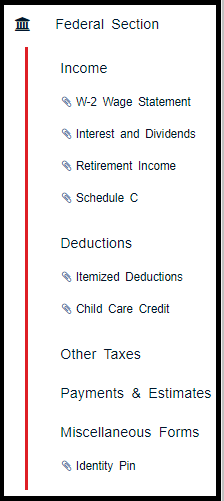
The left navigation bar now reflects the entry forms that have been completed during return preparation.

This will allow the quality reviewer the ability to quickly navigate through the entry forms that were completed during tax preparation by clicking down the displayed items under each Federal Section

See example below:

Note:  We are experiencing the tagged completed entries disappearing if you add an additional form.  We will be working to resolve this over the next couple of weeks.  Our goal for Phase I delivery is to allow you to get a feel for the new feature and allow you to work it into your Quality Review Process.

This seems to be happening in Chrome and not in Internet Explorer

Pro Online: Health Insurance Update – Phase I Live

08 Jan 18
Craig Smith
, , ,
No Comments

Phase I of the new Health Insurance redesign has been released. Phase I incorporates the new flow users will see when preparing 2017 returns starting next week (this is also live in the Practice Lab). Phase II will incorporate the addition of the Affordability Worksheet which is expected to be in production prior to turning on “Start New 2017 Tax Return”. The intent behind the redesign of the flow is to first allow users to claim qualifying exemptions before presenting the option to determine affordability. Assuming the household does not qualify to claim the “Household or Gross Income below…..” exemption, did not receive a Marketplace issued exemption certificate, or does not qualify to claim a coverage exemption, then and only then will the user be presented the option to determine affordability.

The first visible change you will see will be on the “Household Income” screen. This used to be the “Dependents’ MAGI (if filing requirement)” screen. An entry field for “Premium amount paid through salary reduction agreement” has been added. This will be the first step in determining affordability as this entry will be in included in the Affordability Threshold (Line A of Affordability Worksheet).

The second change will be when a user clicks “Continue” on the “Household Income” menu. Clicking continue here is where the automatic determination of “Household or Gross Income below Filing Threshold” exemption will occur. If the return qualifies for this exemption, the exemption will be applied to the return and the Health Insurance menu will be complete. If the return does not qualify for the above mentioned exemption, the user now has the option to claim either a Marketplace issued certificate exemption or another coverage exemption for each household member. They will answer “YES” when asked “Did you qualify for an exemption due to circumstances or receive an exemption certificate from the marketplace?”.
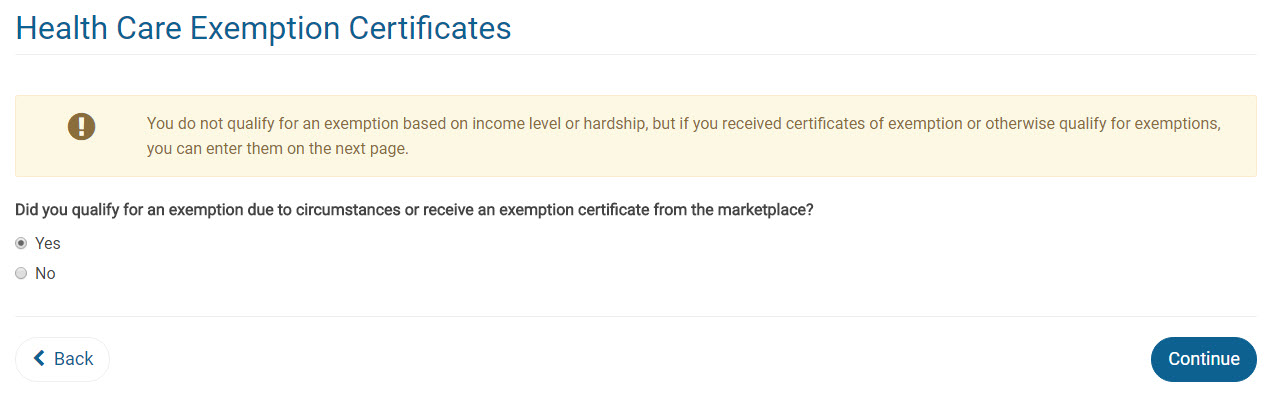
If a user answers “NO” to the above question, “Did you qualify for an exemption…..”, the user will be then asked if they wish to complete the process to determine if the affordability exemption may apply (Phase II coming soon). More details will be released once Phase II has been rolled into production.


Pro Online: Production Update Alert – Friday, January 5th at 5:00am ET

04 Jan 18
Craig Smith

No Comments

A production deployment is scheduled for Friday, January 5th at 5:00am ET in preparation for tax season. This deployment should be completed prior to 8:00am ET.