A production deployment is scheduled for Friday, January 5th at 5:00am ET in preparation for tax season. This deployment should be completed prior to 8:00am ET.
Pro Online: General Sales Tax Entry Issue Reported (RESOLVED)
1/4/18 – 12:53pm ET
This has been resolved and the update is currently being pushed live. Impacted returns will begin to load the Summary/Print page and PDF’s will begin to render as well. Also, we were able to implement Phase II of the General Sales Tax worksheet. Schedule A, Line 5 now shows the calculated general sales tax deduction based on the completion of the General Sales Tax Worksheet.
1/4/18 – 11:10am ET
We have received reports of the Summary/Print menu (and PDF rendering) not loading. Further research determined the underlying action is caused by completing the General Sales Tax worksheet within the Itemized Deduction>Taxes You Paid menu. For immediately resolution, delete the General Sales Tax worksheet. After removing, the Refund Generator will display and PDF’s will render.
Note: You can use the override feature within the General Sales Tax menu to manually report the general sales tax amount to carry to the Schedule A, Line 5.
Pro Online: 1/4/18 Updates
The below items are now live in the Practice Lab and Production Sites.
- 1040 View – Updated to reflect 2017
- If you open an existing return and 2016 still shows on 1040 View, on your keyboard hold Ctrl and press F5. This will recycle the page and update to 2017
- Form W-7 – Under “Identification Submitted”, updated to ask for the middle name instead of just the middle initial. This is shown when the box is checked for “Applicant previously received a TIN or EIN”
- 1040-X – The “Where is this located” link within “Original Federal Return Information” menu for “Other Credits” removed the reference for 1040-EZ since credits do not apply on Form 1040-EZ
- W-2 – Box 14: The selection “MD MSRS C-MD Pickup Contribution” has been removed as it was a duplicate entry. Now, only “MD Pickup Contribution” shows
- Form 1099-K – Text has been added to the “Payment Card and Third Party Network Transactions” information menu to provide guidance on where to report 1099-K income received for rental income
Practice Lab 2017: Prompted to change password
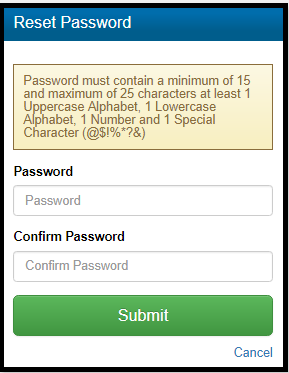
Below are screenshots of the new password requirements for the Practice Lab. You will be automatically prompted to change your password if the password was not established prior to January 3, 2018.
Password prompt with new password requirements
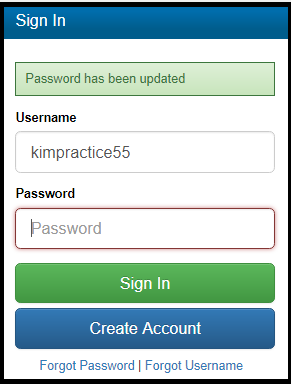
Password screen confirming the password has been updated
Note: This does not impact your production logins because your production site logins use Multi Factor Authentication (MFA)
What if I changed my password to a 15 character strong password prior to January 3rd?
You will still be prompted to change the password. You can recycle the password if it meets the minimum requirements.
Blog posted 01/04/2018
Practice Lab 2017: 1040 View updated to 2017
The 1040 view has been updated to reflect 2017

Pro Online: Production Update Alert – Wednesday, January 3rd at 5:00am ET
A production update is scheduled to take place on Wednesday, January 3rd at 5:00am ET. The scheduled update should be completed prior to 8:00am ET. Items included in tomorrow’s update are listed below.
- Rejected Clients Menu – A return that was transmitted but received a Federal Validation Error will now be visible within the Rejected Clients menu. This expands upon a quick, easy display of rejected Federal returns. You will see a drop down menu to switch your view from Rejected Returns to Validation Errors
- MFA – The default window for prompting MFA will be increased from 7 days to 15 days
- Practice Lab – New requirement of Practice Lab password being at least 15 characters in length
Pro Online: Form 1099-K – Payment Card and Third Party Network Transactions
Inside the Income section, directly under “Profit of Loss From a Business“, you will now see a menu for “Payment Card and Third Party Network Transactions” shown below. Opening this menu will provide guidance of where to report 1099-K income. If adding 1099-K entries on a return where a Schedule C already exists, you will have the option to either add the 1099-K income to the existing Schedule C or create a new Schedule C.


Note: If a 1099-K is provided for rental income received from services such as AirBnB, this income should be reported on a Schedule E.
2017 TaxSlayer Pro Desktop: Office Identifier
Purpose: The Office Identifier is a number generated by TaxSlayer. This is a Vendor Control Number required for electronic filing. The field must be present in the-e-file for acceptance. The goal is for the IRS to validate the number in the e-file with the number uploaded by the software vendor.
Question: Where is this located?
Answer: The field will be displayed on your Office/Firm Setup screen where you enter your Firm Information.
Question: How do I find the office identifier
Answer: Login to My Account from the VITA/TCE Springboard with the username and password you established via the User Information email link once received after your order is processed. Once you are logged in, select Account History on the left navigation bar.
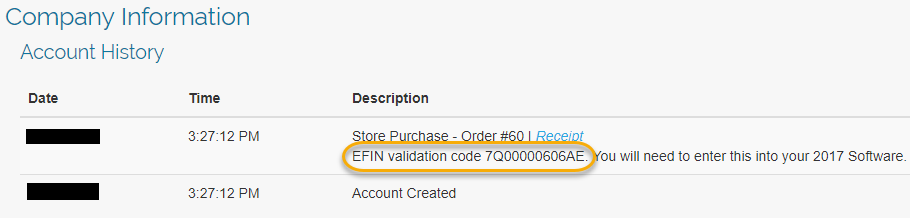
Question: Is this number unique to my site?
Answer: Yes, it is unique to the EFIN.
Question: Will this number ever change?
Answer: The number will change if the EFIN associated with your site changes