Category: What’s New

Pro Online: Form 1099-K – Payment Card and Third Party Network Transactions

28 Dec 17
Craig Smith
, ,
No Comments

Inside the Income section, directly under “Profit of Loss From a Business“, you will now see a menu for “Payment Card and Third Party Network Transactions” shown below. Opening this menu will provide guidance of where to report 1099-K income. If adding 1099-K entries on a return where a Schedule C already exists, you will have the option to either add the 1099-K income to the existing Schedule C or create a new Schedule C.

Note: If a 1099-K is provided for rental income received from services such as AirBnB, this income should be reported on a Schedule E.


Pro Online: F8888 now offers RTN/ACCT Verfication

15 Dec 17
Craig Smith
, , , ,
No Comments

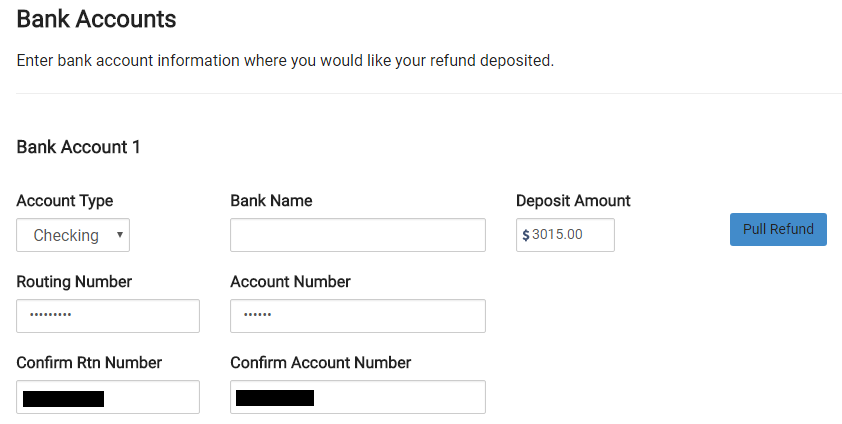
A new feature was released for sites that will be offering the 8888. Now, when entering direct deposit information inside the E-file menu, if your site is set up to offer the 8888, you will be required to verify both the RTN and ACCT numbers provided. This will work just as the current Direct Deposit entry functions for sites that do not offer the 8888 at their sites. After entering the initial RTN/ACCT number information, it will be masked requiring the preparer to verify the confirmation entry by referring to the documents in hand. Adding this new feature for the 8888 will go a long way in ensuring the correct direct deposit information is entered the first time by the preparer before moving to quality review.


Practice Lab 2017/Pro Online: Health Insurance “View/Print” a single Form Live

30 Nov 17
Craig Smith
, , , , ,
No Comments

The “View Form” feature is now live after completing the Health Insurance menu to view either F8962 or F8965.

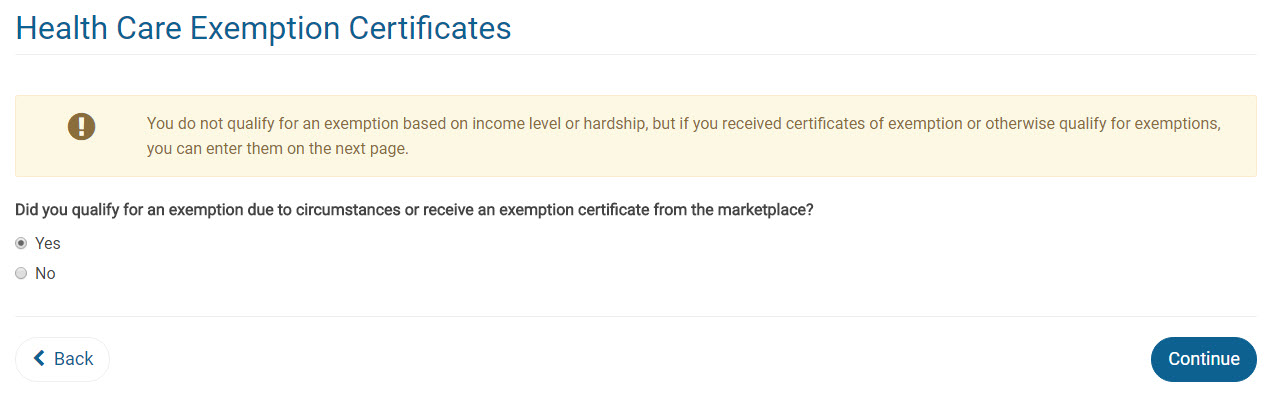
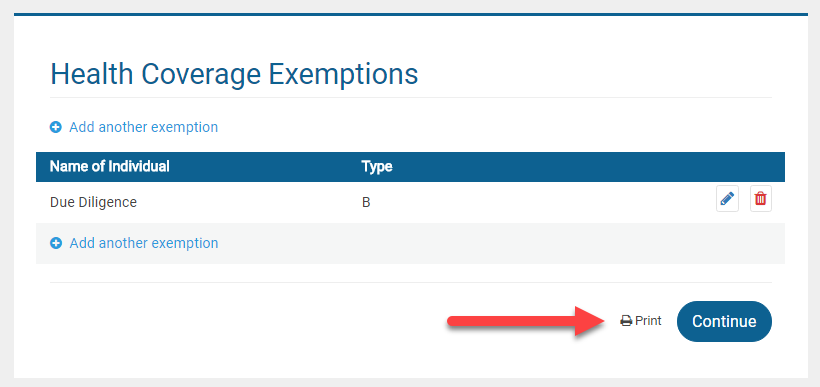
Form 8965: If a return has an exemption claimed, the “View Form” option is available directly on the Health Care Exemption screen after adding the first exemption.


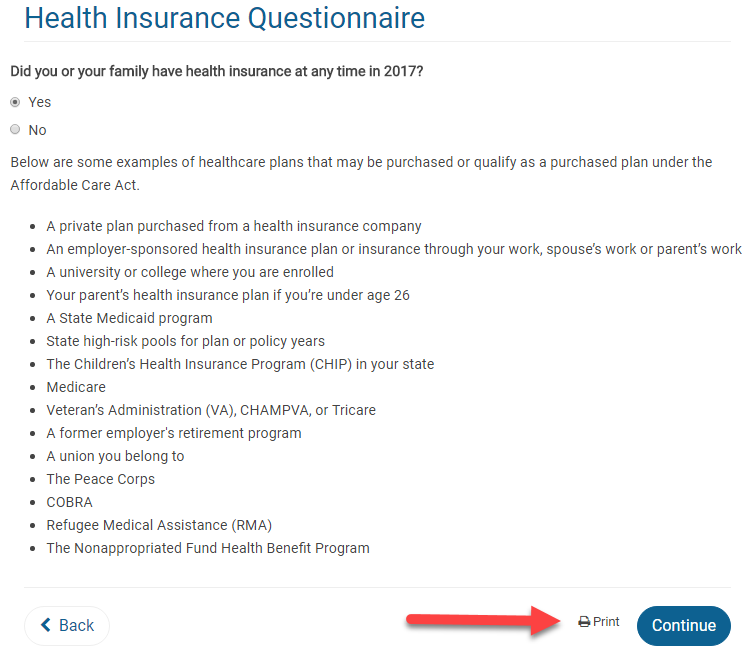
Form 8962: If the return requires Form 8962, the “View Form” option is available on the first page of the Health Insurance Questionnaire AFTER the Health Insurance Questionnaire has been completed. This location was chosen primarily for quality review. When the Quality Reviewer is going back through a return, they will be able to generate the PDF at the beginning of the Health Insurance section prior to checking entries.


Note: Utilizing the “View Form” feature from the above screen will only generate Form 8962 if it is included with the return based on how the Health Insurance section was completed. Otherwise, a blank page will show.

Practice Lab 2017/Pro Online: View/Print a single Form (live in Production)

16 Nov 17
Kim Manuel
,
No Comments

The following feature is now live in production.

Scenario:  When I click the Printer icon on the menu, it gives me a page that looks like a print of the menu.  How do I fix this?

Solution:  Clear your cache or press Ctrl+F5 to reload.


Scenario:  I printed a single form (Schedule C as an example) and then went to immediately print the entire tax return and it is only generating a Schedule C.

Solution:  You can make a change in the return on any screen to render the entire PDF or close the return and print from the client list.  We are going to make a change to the configuration to eliminate this in the morning.


Feature:  Give the volunteer the ability to view the information on specific forms without having to render the PDF for the entire tax return

Example: The preparer completes a Schedule C for the taxpayer and wants to quickly view the information entered for it.  When the preparer clicks continue from the Schedule C summary page and returns to the Income Menu, a print icon will be available.

This will render a PDF of the Schedule C(s) in the return for review or for print.

Forms that will be available to view/print for TaxSlayer 2017:

  • Schedule A
  • Schedule B
  • Schedule C
  • Schedule D
  • Schedule R
  • W-7
  • Form 1116
  • Form 2441
  • Form 5329
  • Form 5405
  • Form 8606
  • Form 8863
  • Form 8880
  • Form 8962 in the Health Care Section (Still in Progress)
  • Form 8965 in the Health Care Section (Still in Progress)

Blog Posted 11/10/2017

Practice Lab 2017/Pro Online 2017: Due Diligence is no longer required

16 Nov 17
Kim Manuel
,
No Comments

The Due Diligence pages are no longer in TaxSlayer Pro Online 2017.  This is now live in production.

The Non Resident Alien question has been moved to the Basic Information section.  Prior to the beginning of e-file, it will disqualify the return from calculating EITC when selected for the appropriate circumstances.

Note:  This change is not applicable to prior year software.

Blog Posted 11/16/2017  11:50am Eastern

Practice Lab 2017: Direct Debit Information

15 Nov 17
Kim Manuel
, ,
No Comments

Scenario:  The tax return has a balance due and a federal return option for Direct Debit is used.

The direct debit information prints on the Client Form Listing Summary in the Quality Review print set.  You can create a custom print set at your sites and include this form.  If the return falls into this scenario, you can select the custom print set that will print the information with the return.

An alternative solution would be to generate the Quality Review PDF and print the page that displays this information and give it to the client.

Blog Posted  11/15/2017  1:02 PM Eastern


Practice Lab 2017: Taxpayers Age

15 Nov 17
Kim Manuel
,
No Comments

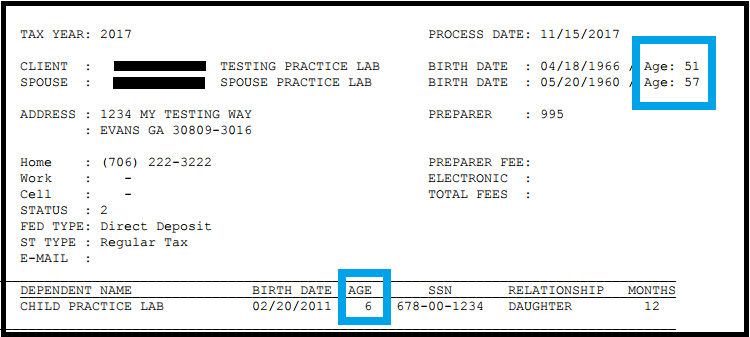
The taxpayer’s age is printing on the Client Form Listing Summary that prints with the Quality Review print set:

Blog Posted 11/15/2017  12:58 PM Eastern


Pro Online: Changes to Preparer setup

19 Oct 17
Kim Manuel
,
No Comments

We have removed the Security Answer and Security Question from Preparer Setup.

Why were they removed?

These are no longer required with the implementation of Multi-Factor Authentication.  The user is now required to receive an authentication code when they select Forgot Password that will be sent to the either the email or cell phone number that is listed in their user account.

Blog Posted 10/19/2017