Category: Training

Pro Online: State Programs – Negative Value Entries

11 Jan 18
Craig Smith
, ,
No Comments

We have received a few issues reported in various states where an entry field acknowleding users can enter a +/- value is not allowing a negative entry (most commonly used when subtraction retirement income, military pay, etc.). This particular issue is across all states and not specific to just a few states. With that said, we are actively investigating to provide a quick resolve but in the meantime, there is a current work around that will allow negative entries to be captured.

For example, if you are looking to subtract $10,000 in a state return, your thinking will have you enter the negative sign “-“ then the amount (-10000). This is currently validating and not being allowed. The workaround would be to enter at least the first two digits (10 in this example) then using your mouse, click to move the cursor in front of the first digit (1 in this example) then you can then enter the “-“ sign. You can also use the “HOME” key on your keyboard for the same result.

Internet Explorer Specific: The negative sign “-“ that must be entered using the above steps must be the one located on the main keyboard to the left of the Backspace button and NOT the “-“ located on the number keypad.

Pro Online: Return Prep Maintenance Alert – 1/9/18 (COMPLETE)

09 Jan 18
Craig Smith
,
No Comments

1/9/18 – 8:40am ET

Return preparation is now out of maintenance as new UI/UX updates were released (User Interface, User Experience).

  • The pill shaped buttons are now rectangle in shape and a little larger
  • The navigational buttons (Edit, Begin, Enter Myself, etc.) are darker in color with white wording
  • When on Summary/Print the left navigation bar is collapsed (previous behavior) but instead of clicking the “Expand” arrows, simply hovering your mouse over the left navigation bar will automatically expand the menu

1/9/18 – 8:18am ET

The site (only return preparation) will be placed into maintenance mode for about 30 minutes beginning at 8:20am ET. This maintenance window will be complete prior to 9:00am ET. This will only impact return preparation.

Pro Online: Health Insurance Update – Phase I Live

08 Jan 18
Craig Smith
, , ,
No Comments

Phase I of the new Health Insurance redesign has been released. Phase I incorporates the new flow users will see when preparing 2017 returns starting next week (this is also live in the Practice Lab). Phase II will incorporate the addition of the Affordability Worksheet which is expected to be in production prior to turning on “Start New 2017 Tax Return”. The intent behind the redesign of the flow is to first allow users to claim qualifying exemptions before presenting the option to determine affordability. Assuming the household does not qualify to claim the “Household or Gross Income below…..” exemption, did not receive a Marketplace issued exemption certificate, or does not qualify to claim a coverage exemption, then and only then will the user be presented the option to determine affordability.

The first visible change you will see will be on the “Household Income” screen. This used to be the “Dependents’ MAGI (if filing requirement)” screen. An entry field for “Premium amount paid through salary reduction agreement” has been added. This will be the first step in determining affordability as this entry will be in included in the Affordability Threshold (Line A of Affordability Worksheet).

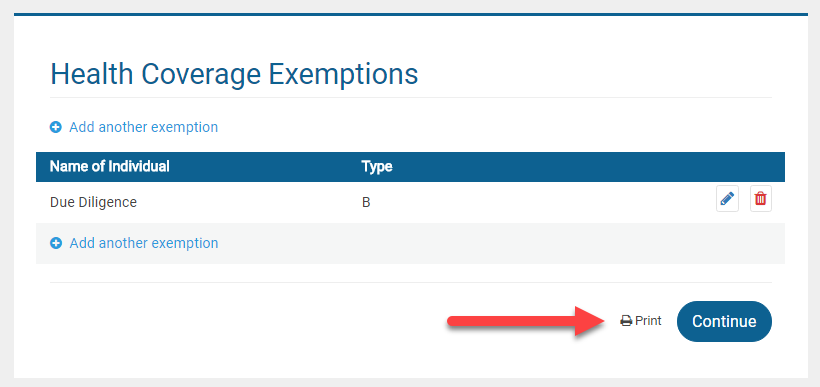
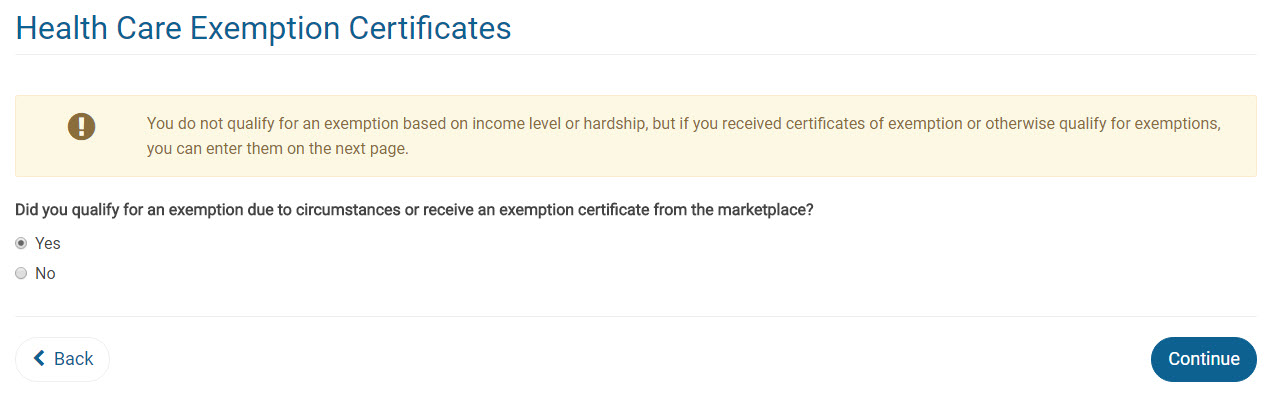
The second change will be when a user clicks “Continue” on the “Household Income” menu. Clicking continue here is where the automatic determination of “Household or Gross Income below Filing Threshold” exemption will occur. If the return qualifies for this exemption, the exemption will be applied to the return and the Health Insurance menu will be complete. If the return does not qualify for the above mentioned exemption, the user now has the option to claim either a Marketplace issued certificate exemption or another coverage exemption for each household member. They will answer “YES” when asked “Did you qualify for an exemption due to circumstances or receive an exemption certificate from the marketplace?”.

If a user answers “NO” to the above question, “Did you qualify for an exemption…..”, the user will be then asked if they wish to complete the process to determine if the affordability exemption may apply (Phase II coming soon). More details will be released once Phase II has been rolled into production.


Pro Online: General Sales Tax Menu Missing State Selection Drop-down (LIVE – 1/4/18)

03 Jan 18
Craig Smith
, , ,
No Comments

1/4/18

Phase II has been released ahead of schedule. Calculated General Sales Tax amounts based on the roll out of Phase I are carrying to the Schedule A, line 5.

1/3/18

Phase II scheduled release for Friday, January 5th, 2018. This will complete the new process of claiming the General Sales Tax Deduction.

12/27/17

Phase I Released: Now, when accessing the General Sales Tax Worksheet screen, your state will automatically be determined by the zip code provided. You are no longer required to manually select the applicable state from a drop-down menu.

Note: With the new implementation of not requiring the state selection from a drop-down menu, Phase II should be released next week to carry applicable figures to Line 5 of Schedule A.

12/22/17

The issue has been fixed and will be corrected live with the next production deployment. The next deployment is tentatively scheduled for the morning of Wednesday, December 27th.

12/12/17

The state selection drop down within the General Sales Tax Worksheet menu was incorrectly removed as a result of this mornings production deployment. Currently, if you complete the General Sales Tax Worksheet, when attempting to save your entry, the screen will validate because the zip code entered does not match the state selected (this is because you are unable to choose a state).

A current workaround to claim the General Sales Tax Deduction would be to visit IRS.gov using the link provided within the General Sales Tax Deduction menu. Once you have obtained the applicable general sales tax amount, click the “Override” button to manually enter your deduction.

Practice Lab 2017/Pro Online: Health Insurance “View/Print” a single Form Live

30 Nov 17
Craig Smith
, , , , ,
No Comments

The “View Form” feature is now live after completing the Health Insurance menu to view either F8962 or F8965.

Form 8965: If a return has an exemption claimed, the “View Form” option is available directly on the Health Care Exemption screen after adding the first exemption.


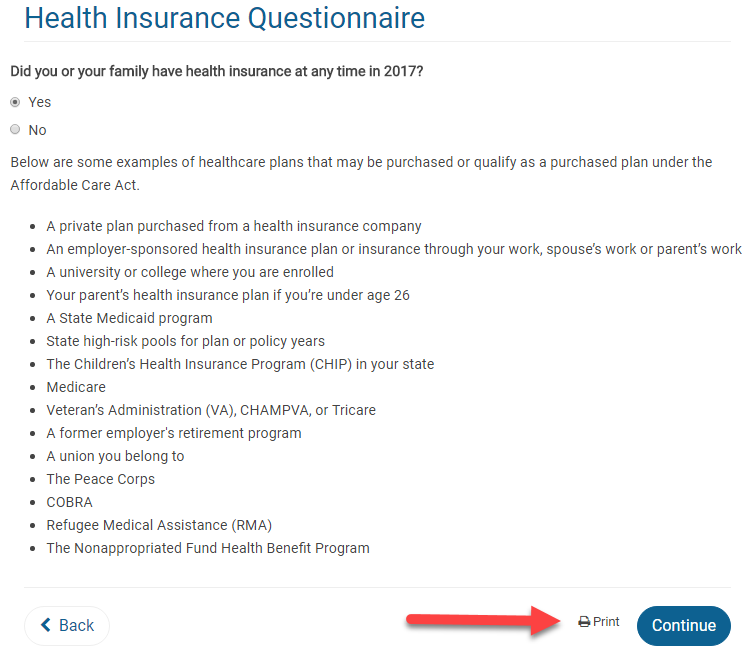
Form 8962: If the return requires Form 8962, the “View Form” option is available on the first page of the Health Insurance Questionnaire AFTER the Health Insurance Questionnaire has been completed. This location was chosen primarily for quality review. When the Quality Reviewer is going back through a return, they will be able to generate the PDF at the beginning of the Health Insurance section prior to checking entries.


Note: Utilizing the “View Form” feature from the above screen will only generate Form 8962 if it is included with the return based on how the Health Insurance section was completed. Otherwise, a blank page will show.

FAQ: Pro Online: Due Diligence Checklist

24 Oct 17
Kim Manuel
, , , ,
No Comments

These are some of the questions we received about the due diligence checklist during our Administrator Webinar:

Q: Are the EITC questions and other questions underneath it going to stay populated when the return goes from the preparer to the reviewer and the reviewer is  going through the screens?

A:  Due Diligence will not be required for TaxSlayer Pro Online 2017.  However, the questions do remain answered for the prior years when someone goes back through them fore view purposes.

Q: If there is no longer a due diligence checklist, how can the preparer remove the EIC when the program calculates it, but the taxpayer does not qualify?

A:  The process will remain the same.  Navigate to Form 8862 via Forms Search and complete the Not Eligible for EIC section

Q: Will the due diligence check list go away for prior years or just TY 2017?

A: Just TaxSlayer Pro Online 2017

Q: Will the Due Diligence checklist go away for desktop?

A:  No, this only applies to TaxSlayer Pro Online.


Blog posted 10/24/2017


FAQ: Pro Online Custom Questions

23 Oct 17
Kim Manuel
, ,
No Comments

These are some of the questions we received about Custom Questions during our Administrator Webinar:

Q: Is there a way to make the Assigned Questions = REQUIRED?

A:  The four default question we deliver at the request of the IRS cannot be marked  as required.  Custom questions that are created at the site level can be marked as required.  If the site belongs to a multi-site or relational group, the questions can be marked required before they are assigned to the site.

Q:  Can you make a pre-set question inactive because you are substituting your own version of the question and you want that one active?

A:  No, assigned questions cannot be marked as inactive, however the 4 assigned are not required to be answered.  It is important to note that if you are using your own version of the question, those answers are not being reported up to the IRS in their weekly reports.

Q: Will the 4 delivered questions show up for all the years of the software, or only for the 2017 year?

A:  Yes, the 4 assigned questions on behalf of the IRS will show up in the returns for all years

Q: How do you collect the data after you have gathered it?

A: Reports can be run at a site level for the data captured for custom questions.

Q:  Can one rearrange the order of the answers to preset questions ?

A:  No, they will be arranged in the order requested by the IRS Core Team.

Q: I want to require Custom questions for the current year, but not for prior years.  Is there a way to “unrequire them” for prior years?

A:  No

Q: Can more than one response to a single question be marked?

A:  No.  If you are seeing a pattern of taxpayers with a combination, you can add that combination to the answer bank at any point.  The modified questions and answers are available for existing and new returns.

Q: Can you delete those questions completely?

A: No, you cannot modify or delete anything assigned to the site.

Blog Posted 10/23/2017


FAQ: Pro Online Custom Credits

22 Oct 17
Kim Manuel
,
No Comments

These are some of the questions we received about Custom Credits during our Administrator Webinar

Q: What are Custom Credits used for?

A: They are typically used to capture data for reporting purposes that changes with each return so a picklist is not a good solution through Custom Questions.  Sites typically use these to capture refundable state credits and any numerical information that may not be captured for reporting purposes when completing the tax return.

Q: I understand. we use to be able to track how many homesteads were processed.  When using the software for 2016, there wasn’t a way to capture this information.

A:  Depending on the data you are collecting, you can capture this information via Custom Questions if Yes/No or by Custom Credits if you are tracking the amount of the credit.

Q: Are they going to be able to use alpha in custom credits?

A:  No, the primary purpose of these fields is to allow the preparer to enter numerical information that changes with each return.

Q: Is there anyway to assign a number to each taxpayer for reporting purposes without using the custom credit section?

A:  No, if you want to assign a unique number to a taxpayer for reporting purposes, you will need to create a custom credit.  This will allow the unique number to be entered.

blog Posted 10/22/2017