Author Archives: %s

Pro Online: Production Update Alert – 12/19 at 6:00am Eastern (UPDATED)

18 Dec 17
Craig Smith
, ,
No Comments


A production update is scheduled for deployment on Tuesday, December 19th at 6:00am Eastern. A couple items included in tomorrow’s update listed below will be pushed live.

  • Minnesota – Adding M1PR to a MN return has been relocated to the “Localities” menu accessible from the main state return grid. The wording “Localities” will be updated to reflect “Property Tax Refund”

  • Schedule K-1 – A fix will be released to properly save Schedule K-1 entries and carry the data to the 1040.
    • An issue existed where if you entered income, saved that entry, then exited the Schedule K-1 menu without continuing through (i.e. exited using the left navigation menu) the remaining sub-menus, the data entered as income was not carrying to the 1040.
  • State Returns– The issue requiring two-clicks within certain state sub-menus to navigate forward or back has been resolved.

Pro Online: F8888 now offers RTN/ACCT Verfication

15 Dec 17
Craig Smith
, , , ,
No Comments

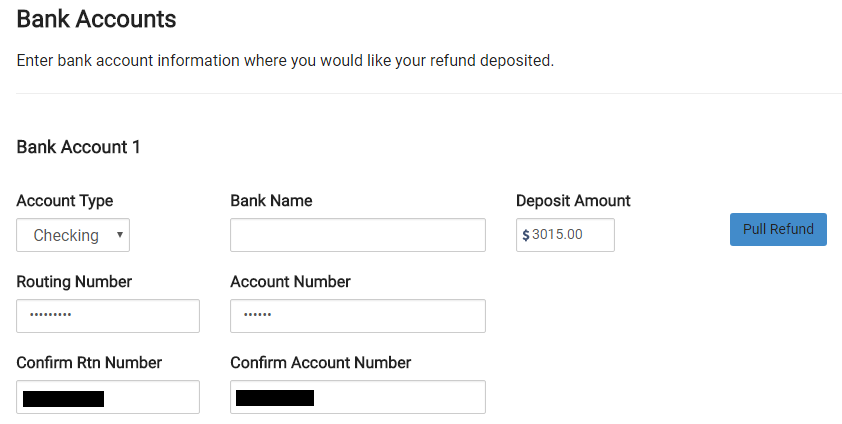
A new feature was released for sites that will be offering the 8888. Now, when entering direct deposit information inside the E-file menu, if your site is set up to offer the 8888, you will be required to verify both the RTN and ACCT numbers provided. This will work just as the current Direct Deposit entry functions for sites that do not offer the 8888 at their sites. After entering the initial RTN/ACCT number information, it will be masked requiring the preparer to verify the confirmation entry by referring to the documents in hand. Adding this new feature for the 8888 will go a long way in ensuring the correct direct deposit information is entered the first time by the preparer before moving to quality review.


2017 Orders: Pro Online – Renewal with No Site Admin Change

15 Dec 17
Craig Smith

No Comments

As we continue to receive and process orders from the IRS, we wanted to post a reminder of how setting up your site works if you are simply renewing for the upcoming tax season and the Site Administrator has NOT changed.

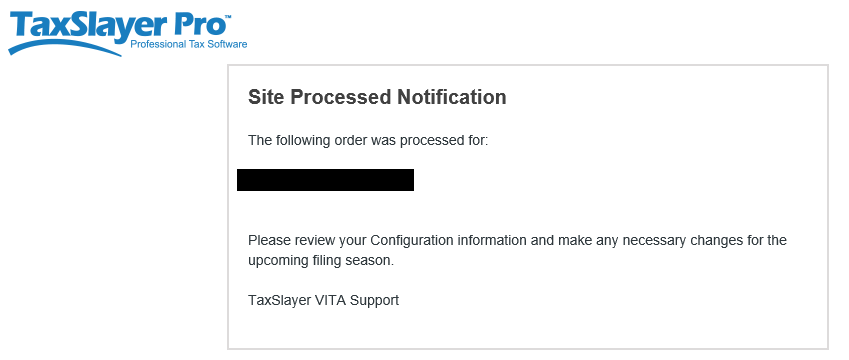
When we receive an order for a site that existed this past tax season and the Site Administrator has NOT changed, the existing Site Administrator (listed on the order) will receive one (1) e-mail from TaxSlayer Pro. The Site Administrator will receive the “Site Processed Notification” e-mail with the message body shown below. Notice a link to activate your site is NOT included. This is because your site was previously activated around this time last year (2016) and is still active. Since you are the existing Site Administrator, use your existing login credentials for the site listed in your e-mail to verify the entries in the “Configuration” menu are accurate and make adjustments if needed.


Pro Online: Production Update Alert – 12/14/17 at 6:00am Eastern

13 Dec 17
Craig Smith
No Comments

A production deployment is scheduled for Thursday, December 14th, at 6:00am Eastern. This update should be complete prior to 8:00am Eastern.

Practice Lab 2017/Pro Online: Health Insurance “View/Print” a single Form Live

30 Nov 17
Craig Smith
, , , , ,
No Comments

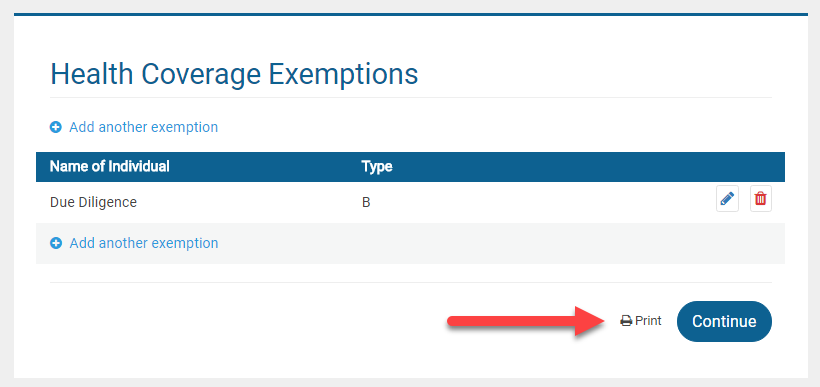
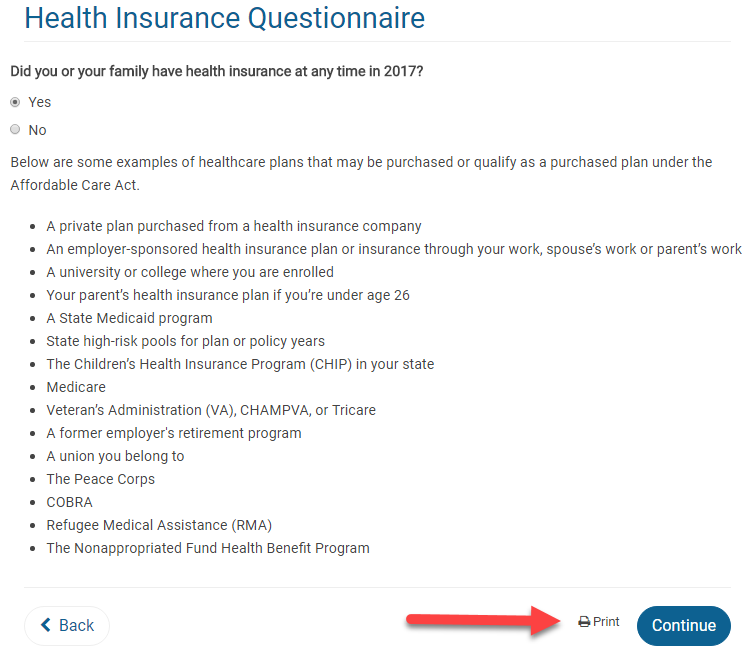
The “View Form” feature is now live after completing the Health Insurance menu to view either F8962 or F8965.

Form 8965: If a return has an exemption claimed, the “View Form” option is available directly on the Health Care Exemption screen after adding the first exemption.


Form 8962: If the return requires Form 8962, the “View Form” option is available on the first page of the Health Insurance Questionnaire AFTER the Health Insurance Questionnaire has been completed. This location was chosen primarily for quality review. When the Quality Reviewer is going back through a return, they will be able to generate the PDF at the beginning of the Health Insurance section prior to checking entries.


Note: Utilizing the “View Form” feature from the above screen will only generate Form 8962 if it is included with the return based on how the Health Insurance section was completed. Otherwise, a blank page will show.

MFA: When Can an E-mail Address be used across Multiple Usernames (Series 2, Part 5)

08 Sep 17
Craig Smith
,
No Comments

One of the common questions received yesterday (9/7/17) after launching MFA was from site administrators or volunteers with a security template allowing access to Configuration>Preparer Setup.

Scenario: I have multiple volunteers at my site that also volunteer at other sites. When I access my own Preparer(s) Setup Menu page, I can see the checkbox to allow my e-mail address to be used across multiple accounts. However, when I access the Preparer(s) Setup Menu page for other volunteers at my site, I do not see the checkbox under their e-mail address entry field.

Q1:  Why can’t I see the checkbox for my volunteers?

A1: The reason you are able to see the checkbox under your Preparer(s) Setup Menu page is because you completed the Account Update screen after MFA was launched.  As each volunteer completes the Account Update screen for their username, the checkbox will be available within their Preparer(s) Setup Menu page.

Site Production State Summary Report: Preparer Name Column Added

23 Aug 17
Craig Smith

No Comments

Within “Management Reports”, the “Site Production State Summary Report” now has a column specific to the Preparer Name shown below. This allows sites to filter state returns prepared by volunteer. This was a request received as some sites are required to produce this information for further funding.